Automated Contact Documents Cleanup Feature
The Automated Contact Documents Cleanup feature gives BHRC administrators a configurable rule engine for automatically deleting stale Contact Document records. It replaces the manual process of identifying and removing outdated resume versions, ensuring that recruiters always surface the most current candidate documents.
This feature is opt-in and disabled by default. No documents are changed in any org until an administrator explicitly enables the feature flag and configures at least one rule.
Key Behaviors
- Documents where isDefault__c = true are always protected. The engine never deletes the default resume regardless of any rule.
- Document types with no rule configured are never touched.
- Within a rule, a document survives if any clause selects it (union logic across clauses).
- The engine is fail-safe: if the saved configuration is invalid or cannot be parsed, the run aborts rather than risking incorrect deletions.
- All deletions are soft-deletes (Salesforce Recycle Bin).
- An audit log entry (Debug_Log__c) is written per Contact, recording the IDs of retained and deleted documents. Document names are excluded from the audit log to avoid storing personal data.
The rules are retention rules: they define what Contact Documents are kept. Everything else is deleted.
Architecture
New Components
This feature introduces a dedicated admin UI, a background cleanup engine, and a permission set. It also adds two supporting building blocks that are shared and reusable across the platform: a generic rule-evaluation library and an asynchronous configuration deployment service.
How It Is Triggered
The cleanup engine can run in two independent modes, which can be enabled individually or together:
- The engine runs automatically each time a new document is added to a Contact record, keeping the Contact tidy in real time.
- A background job sweeps all Contacts in the org at a configured frequency (hourly, daily, or weekly). This catches documents that were added in bulk or before the feature was enabled.
The on-upload trigger is skipped during large bulk data imports to protect system performance. The scheduled sweep acts as the safety net for those cases.
Config Storage
Configuration is stored as a JSON blob in a Named_Setting__mdt record with DeveloperName ContactDocumentCleanup. Admins have no reason to use or update this JSON directly, as all configuration is done through the UI. The structure is:
{
  "version": 1,
  "settings": {
    "runOnInsert": true,
    "runScheduled": true,
    "intervalHours": 4,
    "startTime": "03:00",
    "batchSize": 200
  },
  "rules": [
    {
      "name": "Resume cleanup",
      "appliesToTypes": ["Resume"],
      "countClauses":  [{ "n": 10, "sortField": "CreatedDate" }],
      "ageClauses":    [{ "days": 365, "dateField": "CreatedDate" }],
      "fieldClauses":  [{ "field": "Status__c", "operator": "equals", "value": "Active" }]
    }
  ]
}
Prerequisites
- BHRC v9.70 (package version 2026.08.2) or later must be deployed to the target org.
- The admin performing configuration must have the Contact_Document_Cleanup_Admin permission set assigned (or an equivalent set that includes the Manage_Contact_Document_Cleanup custom permission).
- The enableContactDocumentCleanup Feature Management Attribute (FMA) must be switched on by Bullhorn Support for the org.
The admin UI shows a "not enabled" message and hides all controls if the FMA is off. Assigning the permission set alone is not sufficient. Both the FMA and the permission must be in place before you can configure the feature.
Set Up
Enable the Feature Flag
Request that Bullhorn Support enables the Enable Automated Contact Document Cleanup Feature Management Attribute for the org. This is an LMO-to-Subscriber FMA boolean that defaults to false and cannot be set from within the subscriber org.
Assign the Permission Set
Assign the Contact Document Cleanup Admin (API name: Contact_Document_Cleanup_Admin) permission set to every administrator who should access the configuration UI.
This permission set grants:
- Access to the Contact Document Cleanup app and tab.
- The Manage_Contact_Document_Cleanup custom permission, which is required at runtime. The batch job re-checks this on every self-chained job.
- Apex class access for ContactDocumentCleanupController, MetadataDeployService, and MetadataDeployCallback.
- Read access to the Config_Deploy_Complete__e platform event.
The permission set uses a Salesforce license. Do not assign it to API-only integration users.
Open the Admin UI
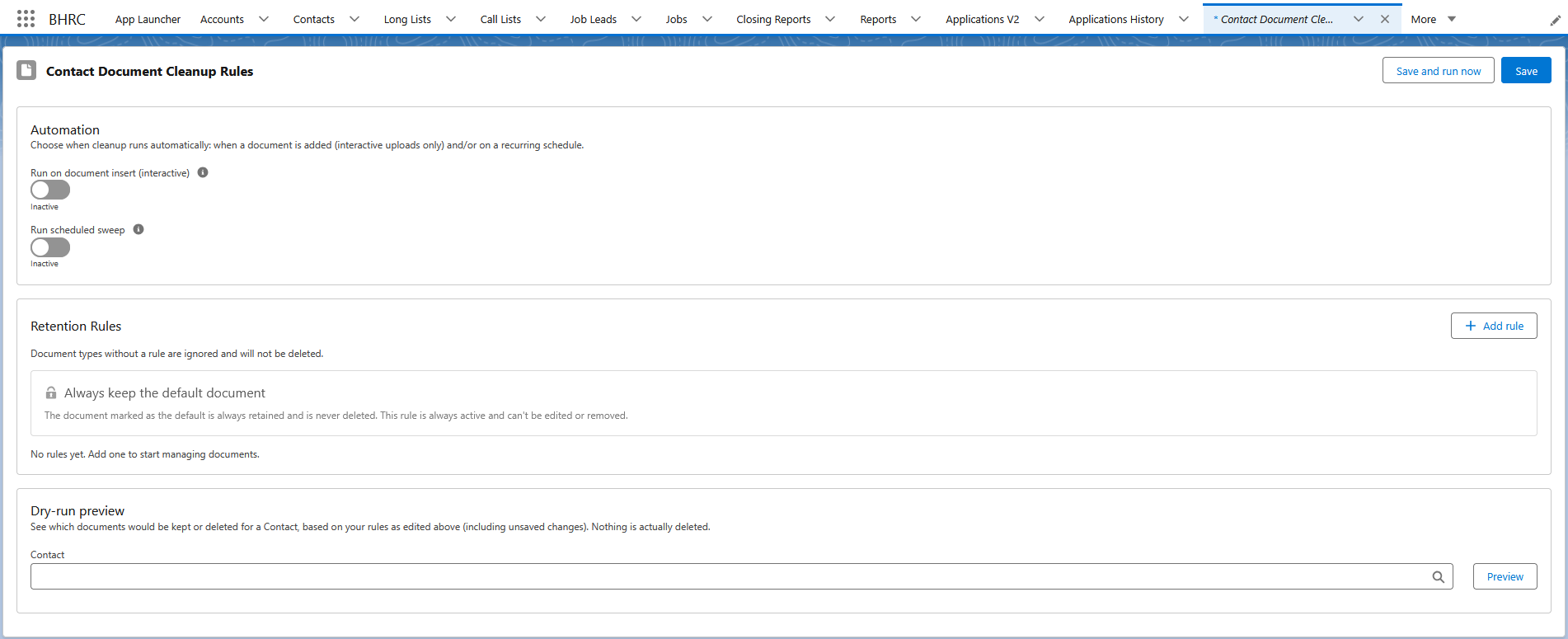
Go to and search for Contact Document Cleanup Admin. The tab is available out of the box. The configuration editor appears once both the FMA and the permission set are in place.
Configure Automation Settings
The Automation section controls when the engine runs:
- Run on document insert (interactive): Applies rules each time a Contact Document is created interactively. A tooltip explains that it is skipped during bulk operations.
- Run scheduled sweep: When toggled on, enables a periodic batch sweep of all Contacts in the org and reveals the scheduling controls below:
- Cadence: How often the sweep runs.
- The options are every 1, 2, 4, 6, 12, or 24 hours, or every 2, 4, or 7 days.
- Starting at: The anchor time for the sweep. Enter the desired Starting at time.
- Batch size: Number of Contacts processed per batch execute() call.
- Default: 200.
- Range: 1 to 2000.
- Reduce this value if you hit CPU time limits on Contacts with very large numbers of documents.
- Cadence: How often the sweep runs.
Add Rules
Each rule targets one or more document types and defines one or more retention clauses. A document is retained if any clause selects it.
Always-on system rule (read-only): The UI shows a locked Default Document rule at the top of the rules list. This is for transparency only and is not part of the saved configuration. It represents the engine's hard-wired behavior: any document where isDefault__c = true is never deleted.
Each rule has the following fields:
- Rule name: a label for the rule. Required before saving.
- Applies to document types: one or more Contact Document types selected from a dual-listbox. Document types not covered by any rule are untouched by the engine.
- Keep clauses (any match keeps the document): one or more retention clauses. A rule with no clauses fails validation.
Clause Types
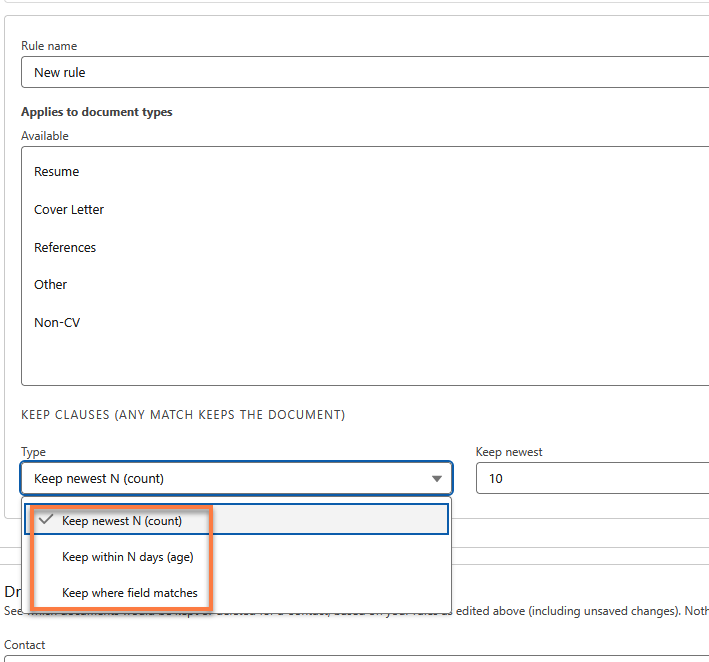
Three clause types are available:
Count clause - keeps the newest N documents of the applicable types, sorted by a configurable date field.
- Keep newest: number of documents to keep (minimum 1).
- Default: 10.
- By date: the date field used for ordering. The options are any Date or DateTime field on ContactDocument__c.
- Default: CreatedDate.
Age clause - keeps documents created within the last N days.
- Within days: number of days (minimum 1).
- Default: 30.
- By date: the date field measured against.
- Default: CreatedDate.
Field clause - keeps documents where a specific field satisfies a condition. Comparisons are type-aware:
| Field type | Available operators |
|---|---|
| Text | equals, notEquals, contains, in |
| Picklist | equals, notEquals, in |
| Multi-select picklist | in |
| Number | equals, notEquals, greaterThan, lessThan, in |
| Date | equals, notEquals, greaterThan, lessThan |
| DateTime | greaterThan, lessThan |
| Boolean | equals, notEquals |
contains and equals on text and picklist fields are case-insensitive. The in operator for text fields accepts a comma-separated list.
Preview Before Saving
Use the Dry-Run Preview section to validate your rules against a real candidate before committing.
- Select a Contact using the lookup field.
- Click Preview.
The UI returns two tables side by side:
-
Would retain (documents that would be kept, with links to each record)
-
Would delete (documents that would be removed)
The preview runs against the currently configured (unsaved) rules, so you can iterate on rule logic before saving.
Save or Delete Rules
Two save actions are available:
- Save: deploys the configuration via the Metadata API.
- Save and Run Now: deploys the configuration, then opens a confirmation modal where you can set the batch size for an immediate ad-hoc run. The batch job is enqueued immediately after confirmation, there is no cancellation once the batch is submitted.
Save and Run Now starts immediately and cannot be canceled. Use the preview step to validate rules on representative candidates before triggering an org-wide sweep.
To delete a saved rule, click the trash bin icon next to the rule, then click Save.
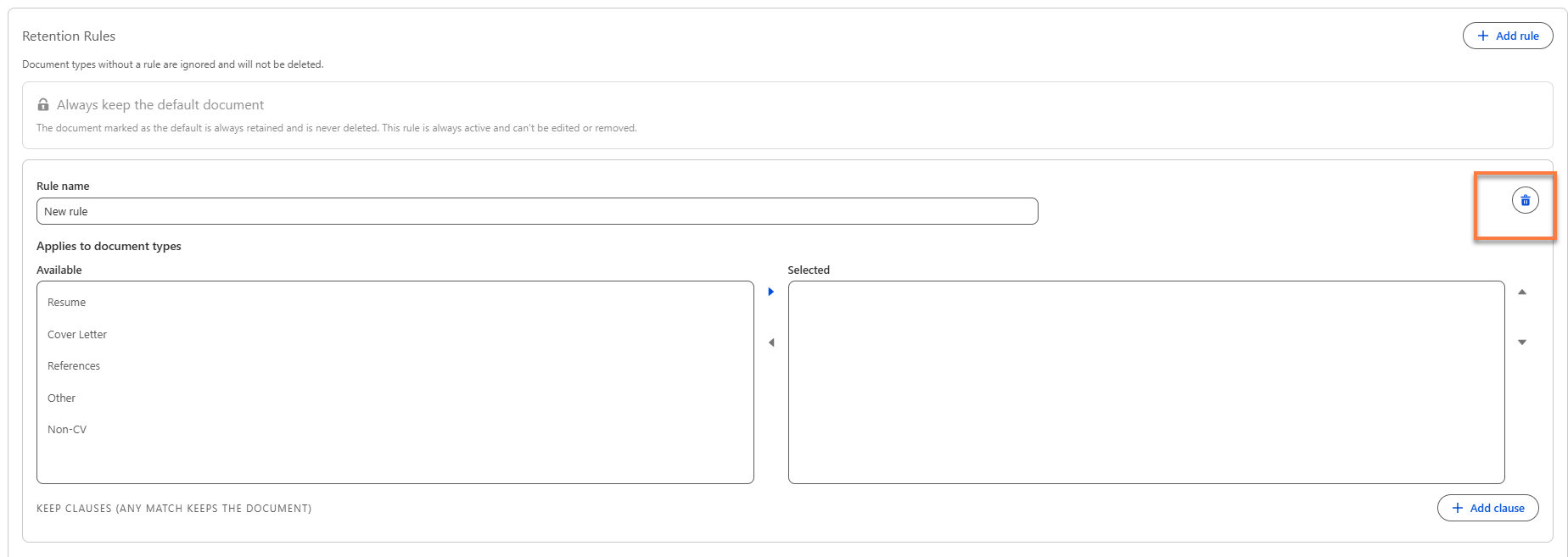
You must click Save after deleting rule(s). If you don't, the rule remains active after refreshing or navigating away.
Runtime Behavior
Engine Logic (Per Contact, Per Run)
For each Contact in scope, the engine:
- Queries all ContactDocument__c records for each Contact in scope, filtered to the document types covered by at least one rule.
- For each document type, applies the union of all matching clauses. Documents not selected by any clause are deleted.
- Removes isDefault__c = true documents from the delete candidate set unconditionally, before any clause evaluation.
-
Document types not covered by any rule are excluded from the query entirely.
Audit Log
After each run, a Debug_Log__c record is written per Contact (Log_Type__c = "Info", Class_Name__c = "ContactDocumentCleanupService"). The message records:
-
Count and IDs of retained documents.
-
Count and IDs of deleted documents.
-
A "deferred" note if DML limits prevented full processing in that run.
Document names are intentionally excluded to avoid storing personal data in the audit trail. For Contacts with very large ID lists, the message is split across multiple Debug_Log__c rows with a [part i of n] prefix so no ID is dropped.
Advanced Configuration
LDV Tuning (batchSliceSize)
The batch sweep defaults to processing 1,000,000 Contacts per chained job. For orgs where this causes timeouts, the hidden batchSliceSize field in the configuration JSON can be reduced. This field is not exposed in the admin UI and must be set by editing the Named_Setting__mdt record directly:
- Go to .
- Find the ContactDocumentCleanup record and edit its JSON value.
- Add "batchSliceSize": <integer> inside the settings object.
Reducing batchSliceSize increases the number of chained batch jobs required to complete an org-wide sweep, which is a trade-off between individual job duration and total sweep time.
Revoking Admin Access Mid-Sweep
If the Manage_Contact_Document_Cleanup custom permission is removed from the admin who last saved the schedule (or triggered Save and Run Now), any in-progress batch sweep stops at the next self-chained job. The batch's start() method re-checks the permission on every continuation, so access revocation takes effect without requiring manual intervention.
Reference
Apex Classes
| Class | Description |
|---|---|
| ContactDocumentCleanupService | Core engine. Evaluates rules, selects documents for deletion, handles DML budget and Queueable self-chaining. |
| ContactDocumentCleanupConfig | Config model. Parses and validates the JSON ruleset stored in Named_Setting__mdt. |
| ContactDocumentCleanupBatch | Scheduled sweep entry point. ID-sliced, self-chaining batch over all Contacts. |
| ContactDocumentCleanupSchedulable | Schedulable wrapper invoked by the Salesforce scheduler. |
| ContactDocumentCleanupScheduler | Builds CRON expression from intervalHours + startTime (UTC to local conversion). Called on every save. |
| ContactDocumentCleanupEnqueuer | After-insert trigger helper. Self-guards against bulk contexts. |
| ContactDocumentCleanupController | Apex controller backing the admin LWC. Exposes loadConfig, saveConfig, previewConfig, runNow. |
| ContactDocumentCleanupAuditLog | Writes Debug_Log__c audit entries. Splits messages across rows when ID lists exceed 32,000 characters. |
| MetadataDeployService / MetadataDeployCallback | Reusable async Metadata API deployment service. Fires Config_Deploy_Complete__e on completion. |
LWC components
| Component | Description |
|---|---|
| contactDocumentCleanupAdmin | Main admin page. Hosts automation settings, rule list, dry-run preview, save/run buttons. |
| contactDocumentCleanupRule | Single rule editor card. Manages document type selection and clause builder. |
| contactDocumentCleanupRunModal | Confirmation modal for Save and Run Now. Allows batch size adjustment before confirming. |
Metadata
| Component | Description |
|---|---|
| enableContactDocumentCleanup | FMA boolean (LMO to Subscriber). Default: false. Controls isEnabled() in the service. |
| Manage_Contact_Document_Cleanup | Custom permission. Required for UI access and checked at every batch job start. |
| Contact_Document_Cleanup_Admin | Permission set. Grants app, tab, Apex, and platform event access. Salesforce license. |
| ContactDocumentCleanup (Named_Setting__mdt) | Stores the ruleset JSON. Edit directly only for hidden LDV settings (batchSliceSize). |
| Config_Deploy_Complete__e | Platform event fired by MetadataDeployCallback on save completion. |