Bullhorn's Billing Policy and Invoice Format
Overview
Bullhorn bills at the contracted minimum number of user licenses, even if your active user count falls below that minimum. If your user count exceeds the minimum, how you're billed for additional users depends on your contract type:
-
High Watermark Contract: Each time users are added, your billing minimum increases to match the new total. Disabled users count as open seats: that seat still applies toward your minimum, but can be reassigned to a new user without increasing your minimum further. This minimum can be renegotiated at renewal.
-
Minimum Monthly Commitment Contract: When you add users above the contracted minimum, you're billed for those users one month in arrears. Once they're disabled, billing returns to your contracted minimum.
If a user account is no longer needed, that license can be reassigned through a user swap. Disable the original user account before enabling the replacement to avoid being billed for both.
If you enable the replacement user before disabling the original, you will be billed for both licenses. Disable first, then enable.
Invoices
Invoices are sent as PDF files via email to the primary billing contact. For billing questions, see How to Get Help with Billing and Invoices.
Bullhorn accepts payment by check, electronic transfer, or ACH. To update your payment method or set up automatic payments, use the Payment Portal.
If you're enrolled in automatic payments, Bullhorn will charge your payment method based on the payment terms in your contract. If you spot an error, contact us right away so we can resolve it before you are charged.
Invoice Sample
The sample below shows the information included on a Bullhorn invoice. Your layout may vary slightly. Each number corresponds to the legend below the image.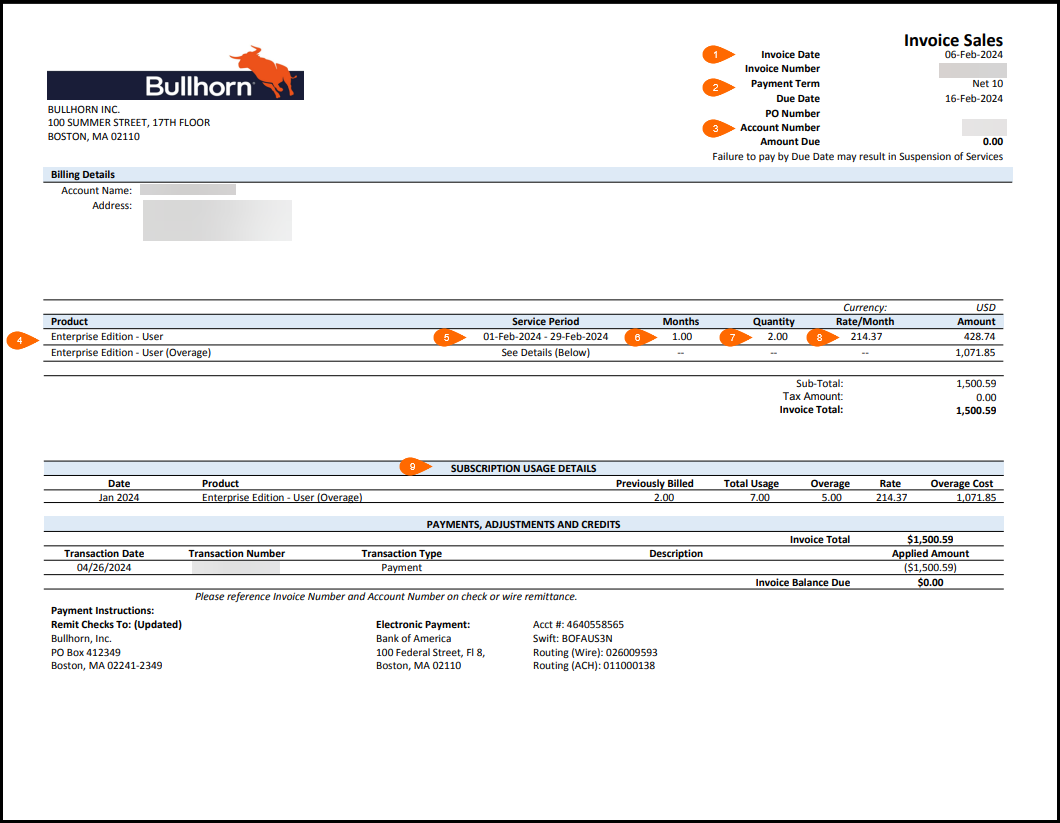
Legend
| 1 |
Invoice date and number: The date the invoice was issued and its unique identifier. Reference the invoice number when contacting Billing Support. |
| 2 |
Payment term: The number of days you have to pay from the invoice date. For example, Net 10 means payment is due 10 days after the invoice date. |
| 3 |
Account number: The unique identifier for your Bullhorn account. |
| 4 |
Product and user type: The Bullhorn edition and user type being billed. |
| 5 |
Service period: The start and end dates for this billing period. |
| 6 |
Months: The number of months covered by this invoice. |
| 7 |
Quantity: The minimum number of users in your contract. |
| 8 |
Rate per month: Your per-user monthly rate. For multi-month invoices, this rate is multiplied by the number of months shown in column 6. |
| 9 |
Subscription usage details: A breakdown of any overage users, including the month, total usage, number of users above your minimum, and the rate and cost for each overage user. |
Bullhorn Bank Information for Electronic Payments
Standard Payment Accounts
Use the following payment details if your product is not listed in the Product-Specific Payment Accounts section below.
|
USD |
|
|---|---|
| Bank Name: |
Bank of America |
| Bank Address: |
100 Federal Street, FL 8, Boston, MA 02110 |
| Account Name: |
Bullhorn Inc |
| Account Address: |
100 Summer Street, 17th Floor, Boston, MA 02110 |
| Account Routing/Transit Number: |
121000248 |
| Account Number: |
4640558565 |
| Swift: |
BOFAUS3N |
| Routing (Wire): |
026009593 |
| Routing (ACH): |
011000138 |
In the memo or the "by order of" field, please include your company ID number, company name, and invoice number(s).
|
AUD |
|
|---|---|
| Bank Name: |
Bank of America N.A. Australia Branch |
| Bank Address: |
Level 33, Governor Phillip Tower, 1 Farrer Place, Sydney, NSW 2000, Australia |
| Account Name: |
Bullhorn Inc |
| Account Number: |
18525013 |
| Account Swift ID: |
BOFAAUSX |
| Account BSB: |
232001 |
In the memo field, please include your company ID number, company name, and invoice number(s).
|
UK |
|
|---|---|
| Bank Name: |
Bank of America, N.A. |
| Bank Address: |
2 King Edward Street, London, EC1A 1HQ, United Kingdom, Branch 6008 |
| Account Name: |
Bullhorn International Limited |
| Account Number: |
83002023 |
| SWIFT: |
BOFAGB22 |
| IBAN: |
GB85 BOFA 1650 5083 0020 23 |
Product-Specific Payment Accounts
If you use one of the following Bullhorn products, use the payment details for that product instead of the standard accounts above.
|
Invenias |
|
|---|---|
| Bank Name: |
Bank of America N.A. |
| Bank Address: |
2 King Edward Street, London, EC1A 1HQ, United Kingdom, Branch 6008 |
| Account Number: |
83004037 |
| BIC Identifier: |
BOFAGB22 |
| IBAN: |
GB27BOFA1650583004037 |
| Sort Code (CHAPS): |
16-50-50 |
| Sort Code (BACS): |
30-16-35 |
Please reference your Invoice Number and Account Number on check or wire remittance.
|
Peoplenet |
|
|---|---|
| Bank Name: |
Bank of America |
| Bank Address: |
100 Federal Street, Fl 8, Boston, MA 02110 |
| Account Number: |
4640558523 |
| Swift: |
BOFAUS3N |
| Routing (Wire): |
026009593 |
| Routing (ACH): |
011000138 |
| Check Payable To: |
Peoplenet Corporation, PO Box 412367, Boston, MA 02241-2367 |
Please reference your Invoice Number and Account Number on check or wire remittance.
|
Talent Rover UK |
|
|---|---|
| Bank Name: |
Bank of America Merrill Lynch International DAC |
| Bank Address: |
2 Park Place, Hatch Street, Dublin 2, Republic of Ireland |
| Account Number: |
57375010 |
| IBAN: |
IE65 BOFA 9900 6157 3750 10 |
| SWIFT Code: |
BOFAIE3X |
| Branch Code: |
6022 |
Please reference your Invoice Number and Account Number on check or wire remittance.
|
Textkernel |
|
|---|---|
| Account Name: |
Textkernel B.V. |
| Bank Name: |
Bank of America |
| Bank Address: |
Rembrandt Tower, Amstelplein 1, 1096 HA Amsterdam, The Netherlands |
| Account Number: |
31205029 |
| SWIFT Code: |
BOFANLNX |
| IBAN: |
NL26 BOFA 0031 2050 29 |
Please reference your Invoice Number and Account Number on your wire remittance.
Paying by Check
To pay by check, make it payable to Bullhorn, Inc. and mail to the address below. Include your Invoice Number and Account Number on the memo line.
Bullhorn, Inc.
PO Box 412349
Boston, MA 02241-2349