Employee Setup
The Employee Setup screen contains insights and settings per employee.
Main Tab
Do not change anything on this tab. If you need to update an employee SSN, contact Bullhorn Support.
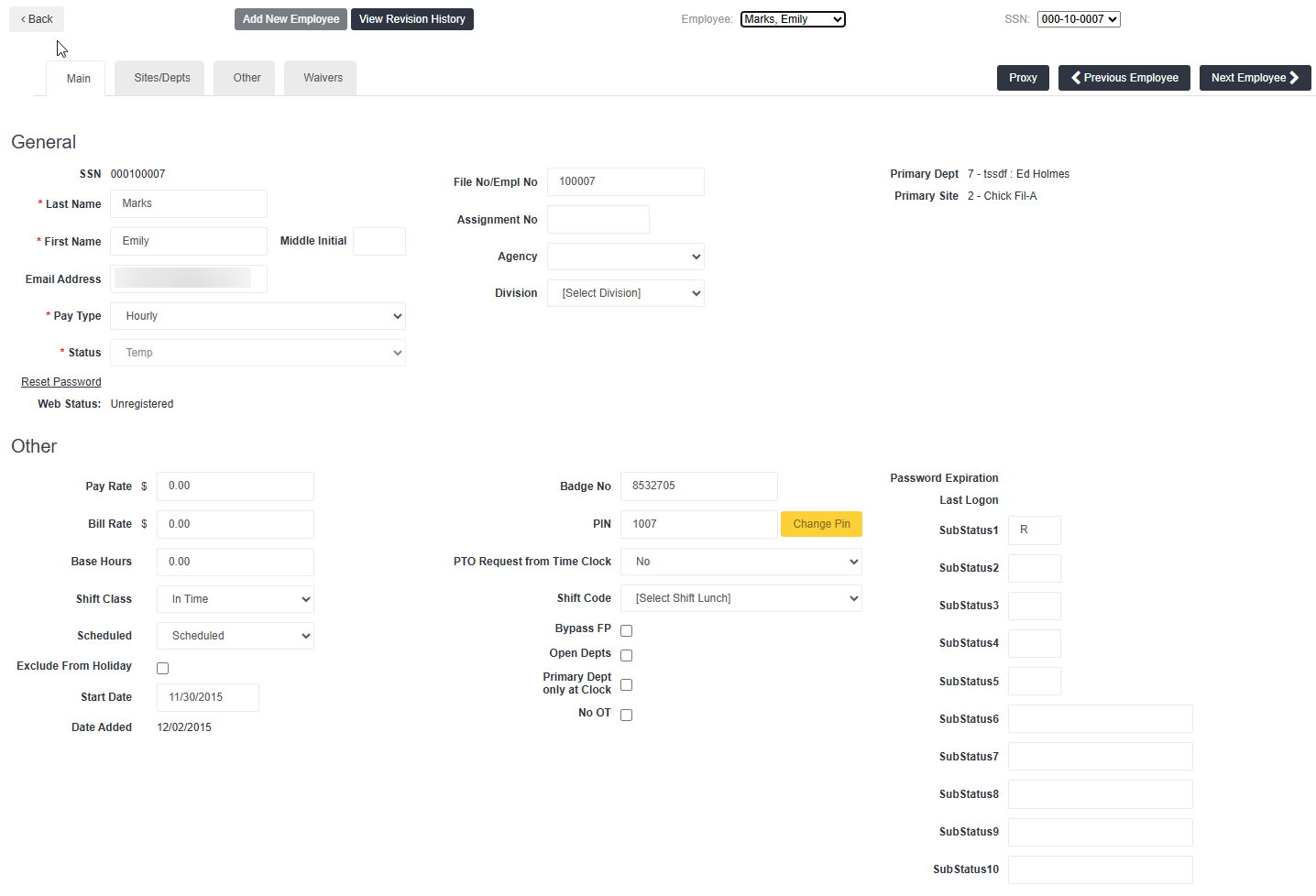
This tab gives general information about the employee / placement. For example, SSN, Name, Email, Primary Department, Primary Site, etc. This page has two main sections:
-
 General
Some setting in this section are rarely used. The following fields are commonly used and may need to be referenced when troubleshooting.
-
SSN: Employee SSN or placeholder (dummy) SSN sent over by an agency's Front Office.
-
Last Name and First Name: If an employee is registering for WTE this is the name they need to enter to find their assignment.
-
Email Address: This should be an email address the employee has access to. All reminder or password reset emails will go to this address.
-
Pay Type: Generally only used when the client wants to set someone as Salaried. This setting ties to Base Salary in the next section.
-
Status: Not common, but may need to be checked for visibility while troubleshooting.
-
File No/Empl No: May need to reference to compare to the refresh file.
-
Primary Department: Employee's primary department. More info can be found on the Sites/Depts tab.
-
Primary Site: Employee's primary site. More info can be found on the Sites/Depts tab.
-
Reset Password: Sends a password reset email to the email on file. For WTE only.
-
Web Status: Indicates if the employee has registered for WTE or not.
-
-
Other
Most settings in this section aren't commonly used. The only settings you may need to look at for troubleshooting purposes are the following:
-
Base Hours: Used to auto-populate time for employee set as Salaried.
-
Pin: This is the pin an employee uses to punch into Clocks. It's possible you may need to update this in some clock troubleshooting cases.
-
No OT: Records all time as regular, regardless of how many hours are worked. However, this is normally set via the refresh process.
-
Open Depts: Controls Open Departments for the employee. However, this is normally set for the whole clock client, not individual employees.
-
Sites/Depts Tab
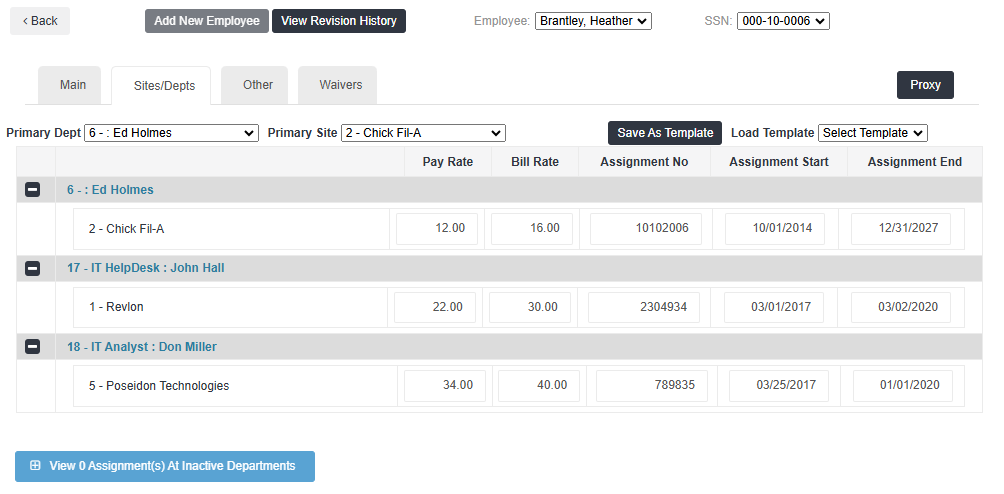
This tab outlines what sites and departments an employee is assigned to. This information is tied to the assignment that comes over from the front office system.
Do not make any changes on this tab. Any changes made to the information here will be overwritten by the Front Office system on the next refresh or sync.
Other Tab
This tab contains the following sections:
-
Personal Items: This section details the placement's phone number, address, etc. Do not make updates to this section.
-
Contact Preferences
-
Delivery Info: Email, phone number, and carrier. These settings align with what's available in WTE under My Profile.
-
Delivery Preferences: Controls notification preferences. These settings align with what's available in WTE under My Profile.
-
Time Off Requests: Checkboxes control whether a notification gets sent to the placement if Time Off Requests are approved or rejected.
-
-
Payroll Items: This section details exemptions and marital status. Do not make updates to this section.
-
Web Time Entry
The validity of the settings in this section are dependent on the client's configuration. For example, some clients have the following information in their refresh file, which will override change made in the Employee Setup. Do not change any of these settings without doing further research into the client's set up.
-
Allow Time Clock: Determines if the placement can use Virtual Time Clock (VTC).
-
Allow Time Entry: Determines the type of time entry available to the placement.
-
In Outs: Controls if time is enter via In/Out in WTE. If they are set to Total Hours and have logged in for the week and you change to In/Out, the change will not apply until next week.
-
Allow PTO: Determines if the placement can or cannot view PTO accrual and submit PTO requests.
-
Allow Approval: Determines if time approval is needed or not.
-
Allow Expense Entry: Allows placement to submit expense reports.
-
Breaks Rule: Outlines what Break Rules are in place for the placement.
-
Waivers Tab
The Waivers tab controls an employee's waivers. For setup and management see Employee Level Waiver Settings.