Using Amplify Verify
Amplify Verify is currently in Early Access. For more information, speak to your Bullhorn representative.
Amplify Verify analyzes each application when it is submitted and displays a Trust Level with plain-language signal details on the candidate record and in the candidate list.
Signal Categories
Amplify Verify groups signals into four categories, each answering a specific question about the application.
-
Behavioral: Was this application filled out by a real human? Captures signals from how the candidate physically interacted with the form, including mouse movement, scrolling, clicking, typing patterns, honeypot field interactions, virtualized environments, and automated-submission patterns.
Behavioral signals are only available for candidates who applied through a channel where the Bullhorn JavaScript snippet is installed. If the snippet is not installed, the Behavioral category will show no signal data.
-
Misrepresentation: Did the candidate write their own answers? Detects signs of copy-paste behavior, AI-generated content, or responses sourced from outside the application.
-
Identity: Is the network connection and device trustworthy? Examines VPN and proxy usage, bot confidence from device fingerprinting, device and network (IP) reuse across candidates, abuse blocklists, fingerprint tampering, disposable email, and location consistency.
-
Consistency: Are there signs of unusual changes or drift over time? Flags patterns such as phone number or email changes, conflicting resume versions or inconsistencies between a candidate's profile and their application history.
Amplify Verify on the Candidate Record
When Amplify Verify processes an application, results appear on the candidate record in two places: The Trust Level field and the Verify slideout.
The Trust Level field in the candidate record header shows the overall result at a glance: Clear, Flagged, Needs Review, or No Signal Data.
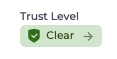
Click the Trust Level field to open the Verify slideout. The slideout shows:
-
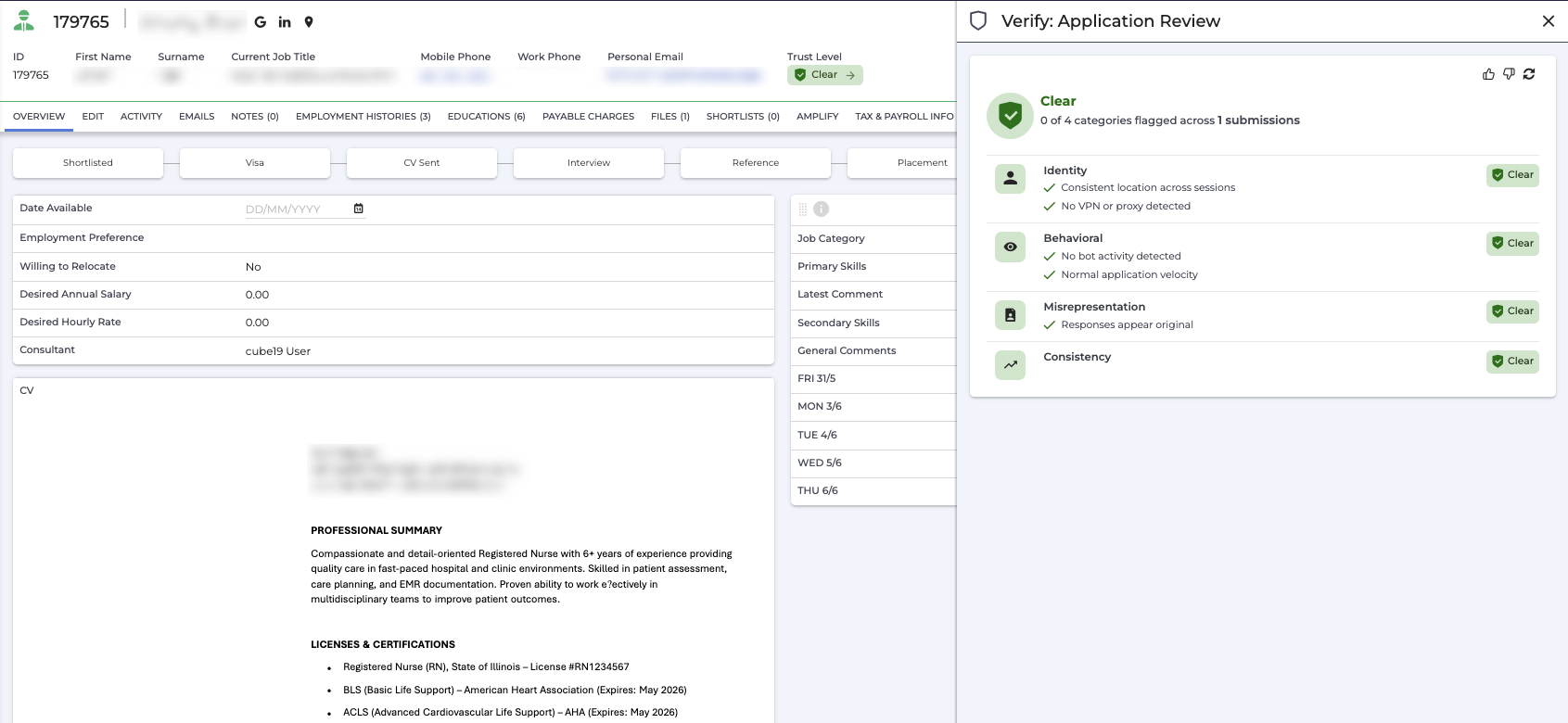
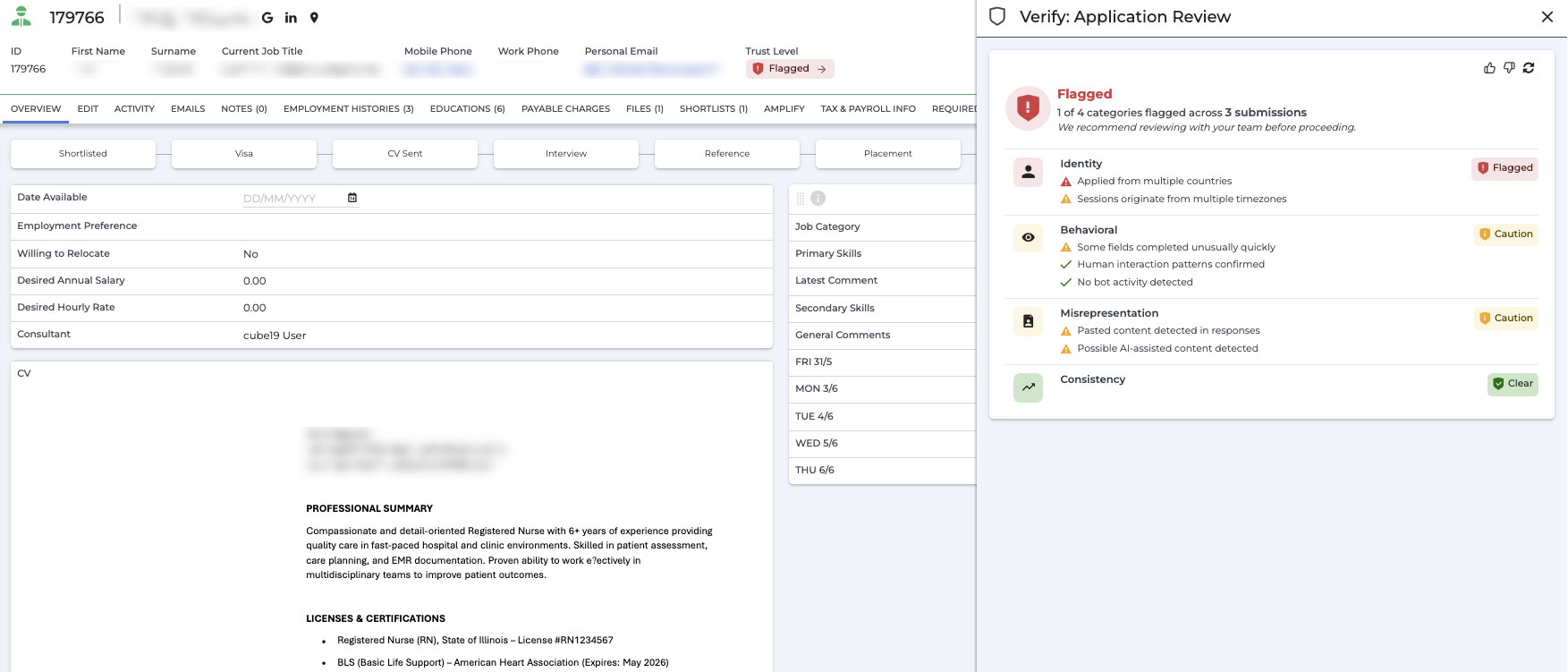
The overall result, a count of how many of the four categories were flagged across all submissions, and advisory guidance for Flagged results
-
All four categories, each showing a badge:
-
Flagged (red) if a Flagged-level bullet was triggered
-
Caution (yellow) if only Caution-level bullets were triggered
-
Clear (green) if no signals were detected
-
-
Individual signal bullets beneath each category, with a colored icon:
-
Red triangle for Flagged,
-
Yellow triangle for Caution,
-
Green checkmark for Passed
-
A category can show a mix of Caution and Passed bullets. When this happens, the category shows as Caution.
The slideout includes thumbs-up and thumbs-down buttons. Your feedback helps improve the accuracy of Amplify Verify results over time.
Clear (with slideout details):
Flagged (with slideout details):
Amplify Verify on the Candidate List
You can also view Trust Level as a filterable column on the candidate list view, so you can see a candidate's status at a glance without opening their record. To add this column, click Columns at the top of the candidate list and add Trust Signal Classification to your column layout.
Contact Verification Status
If Display contact verification status is enabled in your Verify settings, Amplify Verify displays a verification icon next to phone number and email address fields on the candidate record and in the candidate list view.
-
A green icon indicates the phone number or email address has been verified as valid.
-
A red icon indicates the phone number or email address may be invalid.
This gives you a quick check on contact details without needing to open the Verify slideout.
Trust Level Definitions
| Result | Definition | What it means |
|---|---|---|
|
Clear |
No significant risk signals detected, or one or more moderate signals detected that are not conclusive indicators of fraud or misrepresentation. |
If no Caution signals are present, nothing here stands out as a reason to pause. If Caution signals appear, review them before advancing and consider additional screening. Clear is not a disqualifying result. |
|
Flagged |
Multiple strong risk signals detected across key categories. Significant concerns about application authenticity, identity integrity, or automated or fraudulent submission. |
Multiple signals across this candidate's sessions raise concern. Review the flagged signals with your team and verify their details through additional sources before taking further action. |
|
Needs Review |
Some signals indicate potential concern, but the evidence is not conclusive. |
Something in this candidate's application is worth a closer look, but it doesn't meet the threshold for a Flagged result. Review the signals in the slideout and use your judgment before advancing the candidate. |
|
No Signal Data |
No application data has been collected for this candidate. |
The candidate has not applied via a monitored channel. No assessment is available. |
Flag, don't block. A VPN, an unusual location, or an imperfect answer can trigger a signal without indicating bad intent. Amplify Verify is a signal, not a verdict. You retain full discretion on every hiring decision.
Signal Library
Each table below describes the signals that may appear in the Verify slideout and the conditions that trigger them. Signal descriptions in Bullhorn ATS reflect the data collected for each application and may vary in wording.
How signal types map to results:
-
A Clear overall result shows Passed signals (confirming genuine behavior), Informational signals (neutral context, not counted as risk), and Caution signals (patterns worth noting but not conclusive on their own).
-
A Flagged overall result shows Flagged signals (strong evidence of automated, fraudulent, or misrepresented submissions) and Caution signals first, with any Passed signals alongside them.
Passed Signals
| Signal Category | Signal Description | What triggered it |
|---|---|---|
| Identity | Consistent location across sessions | The application originated from a single country. |
| Device exclusive to this candidate | Neither the device fingerprint nor the network IP address has been associated with other candidate records. | |
| No VPN or proxy detected | Connection appears genuine; VPN/proxy confidence score is negligible (below 0.2). | |
| Behavioral | Human interaction patterns confirmed | Natural scrolling, pointer movement, and clicking were all captured during the session. |
| No bot activity detected | Automated behavior score is low; no honeypot field interactions, | |
Misrepresentation | Responses appear original | Content shows very low AI-probability; no AI keyphrases detected and minimal paste activity from external sources. |
Informational Signals
Neutral context: shown for awareness, not counted as risk and doesn’t affect scoring.
| Signal Category | Signal Description | What triggered it |
|---|---|---|
Identity | VPN detected | VPN/proxy confidence ≥ 0.5 |
Caution Signals
| Signal Category | Signal Description | What triggered it |
|---|---|---|
Behavioral
| Application completed from a virtual machine | Session ran inside a virtualized environment |
Bot detected on this device | Bot confidence ≥ 0.5 from device fingerprinting | |
Browser fingerprint appears tampered with | Fingerprint tamper confidence ≥ 0.5 | |
Higher-than-typical application rate | 4–10 job applications per day | |
Several sessions started in a short burst | 3 or more sessions started in a short time window | |
Some fields completed unusually quickly | At least one field completed suspiciously fast | |
Some fields were filled without keyboard input | At least one field filled without trusted keyboard input | |
Identity
| Applications submitted from many different IP addresses | 4 or more distinct IP addresses used |
Applications submitted from several different devices | 3 or more distinct devices used | |
Device shared with other candidate(s) | Same device used by 1–5 other candidates in the past 7 days | |
Disposable email address detected | At least one disposable / throwaway email address used | |
IP address appears on abuse blocklists | IP flagged as an attack source, Tor exit node, or email-spam source | |
Network (IP) shared with other candidate(s) | Same IP used by 1–10 other candidates in the past 7 days | |
Sessions originate from multiple timezones | 2 or more distinct timezones across sessions | |
Misrepresentation
| Pasted content detected in responses | 3 or more pasted answers, or at least one answer pasted from outside the form |
Possible AI-assisted content detected | At least one AI keyphrase, or content authenticity score in the moderate range (0.3–0.7) |
Flagged Signals
| Signal Category | Signal Description | What triggered it |
|---|---|---|
Identity
| Applied from multiple countries | Applications from 2 or more distinct countries |
Device shared with many candidates | Same device used by 6 or more other candidates in the past 7 days | |
Identity signals are inconsistent | Different-person score ≥ 0.7 AND fingerprint tamper confidence ≥ 0.5 | |
Network (IP) shared with many candidates | Same IP used by 11 or more other candidates in the past 7 days | |
Other candidates on the same network show high-risk signals | 2 or more other candidates on the same IP show fraud evidence | |
Behavioral
| Automated submission detected | Bot score ≥ 0.7, no human scrolling or pointer movement, and rapid form submit |
Honeypot field interaction detected | At least one major honeypot field interaction (fields invisible to real users) | |
No measurable human interaction detected | Rapid form submit with no scrolling, clicking, or pointer movement | |
Misrepresentation | Strong AI-generated content patterns detected | 3 or more AI keyphrases, or an AI keyphrase inside pasted content, or content authenticity score ≥ 0.7 |
FAQ
Why is a candidate I trust showing as Flagged?
Amplify Verify flags signals, not intent. A Flagged result means the application triggered multiple strong signals, not that the candidate has done anything wrong. VPN use, a shared device, or AI-assisted writing can all trigger signals for legitimate reasons. Review the flagged signals, use your judgment, and consider additional screening steps before making a final decision.
Does a Flagged result automatically disqualify a candidate?
No. Amplify Verify is a signal, not a verdict. All hiring decisions remain entirely with you. A Flagged result simply means manual review is recommended before advancing the candidate.
Can a candidate see their result?
No. Results are only visible on the candidate record in Bullhorn ATS and are never shared with the candidate.
Can caution signals appear on a Flagged result?
Yes. A Flagged result shows Flagged-level signals first, but Caution signals and Informational notes can appear alongside them, and Passed signals may also be shown if a category is clear. This gives you the full picture across all categories.
Why is a candidate that recently applied showing as “No Signal Data”?
No Signal Data means Amplify Verify has not collected any session data for this candidate. This happens when a candidate applies through a channel that isn't monitored by Amplify Verify, such as LinkedIn or Indeed. If the candidate subsequently completes a screening or fills out a form through a monitored channel, Amplify Verify will collect signals from that session and use them to score the candidate.