GDPR Campaigns
Bullhorn Automation supports GDPR compliance by automating consent collection, tracking, and action workflows. This article covers how to enable the Consent Module in Bullhorn Automation, and how to configure automations, lists, and surveys for a complete GDPR campaign workflow.
GDPR (General Data Protection Regulation) is a set of rules enacted by the EU to protect candidate and contact data and give individuals control over their own information.
This is not legal advice. Consult with GDPR professionals for comprehensive strategy development.
Before You Begin
The Consent Module must be configured in Bullhorn ATS before using Bullhorn Automation for GDPR campaigns. For setup instructions, see Bullhorn ATS Opt-In and Consent . If the Consent Module is not enabled in your ATS, log a support case to get it activated.
Automations
The following automations support a complete GDPR consent workflow.
Inform and Gather Consent
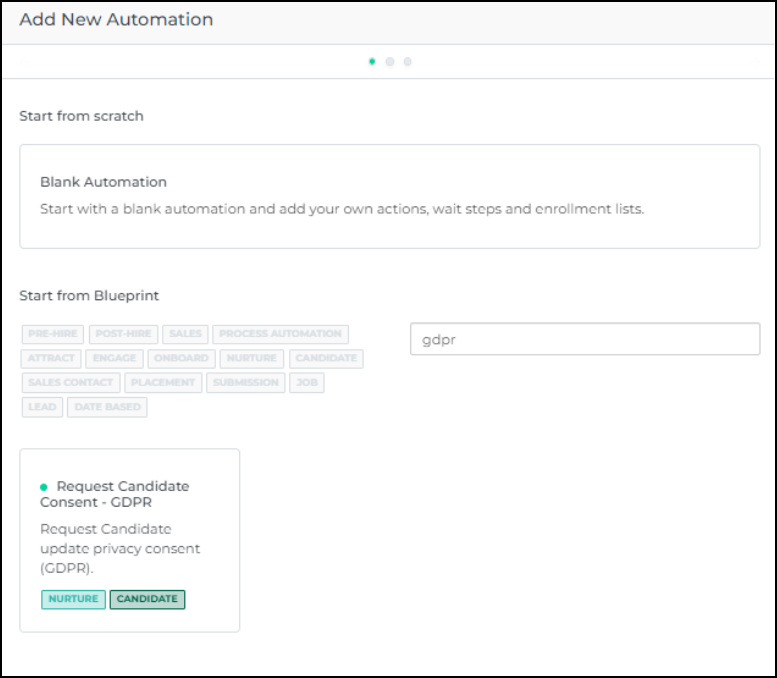
This automation informs new and existing contacts about the possession of their data, the data sharing policy, and gathers their consent. Use the Request Candidate Consent - GDPR Blueprint A prebuilt template in Bullhorn Automation for commonly used automations. Automation to request consent from candidates and contacts who have no stored consent in the Bullhorn Consent Module from the past four years. The automation sends a short survey that saves responses to the Consent Module in the ATS.
Review and adjust the automation steps and wording to fit your business processes.
Although this automation uses a Candidate-based Survey for both Candidates and Sales Contacts, it is not recommended to use a Candidate-based Survey for Sales Contacts in any other context. Certain limitations exist outside the parameters of the consent-gathering use case.
Consent Given
When a contact gives consent, Bullhorn Automation stores their answers in the Consent Module. Take further action on these records, such as including them in email campaigns and updating their consent status based on your internal process.
Consent Revoked
When consent is revoked, Bullhorn Automation updates the Consent Module. A lack of response can also be treated as consent revoked, depending on your process.
Lists
Lists A collection of ATS records that meets specified criteria, such as a scheduled end date or a low NPS response. control which records enter each stage of a GDPR campaign.
Inform and Gather Consent List
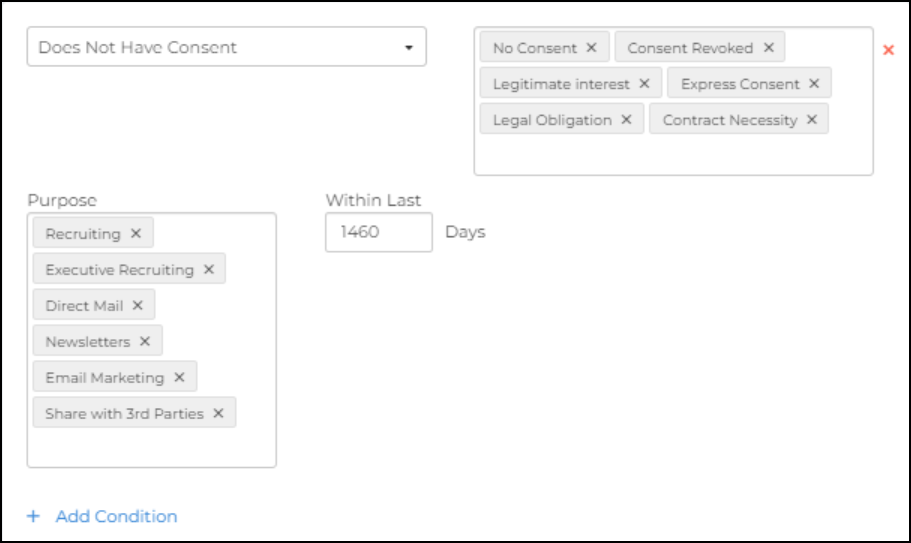
Within the Request Candidate Consent - GDPR Blueprint Automation, the List targets all records with no Consent stored in the Consent Module for the past four years. This includes both new records and existing records where consent has expired.
Depending on your existing processes, you may need to adjust the list to target only new records, or only existing records where consent has expired. Adding a Date Added criteria is relevant in both cases. Some organizations also filter by candidate source, since permissions and messaging may differ depending on where candidates originated.
Consent Given List
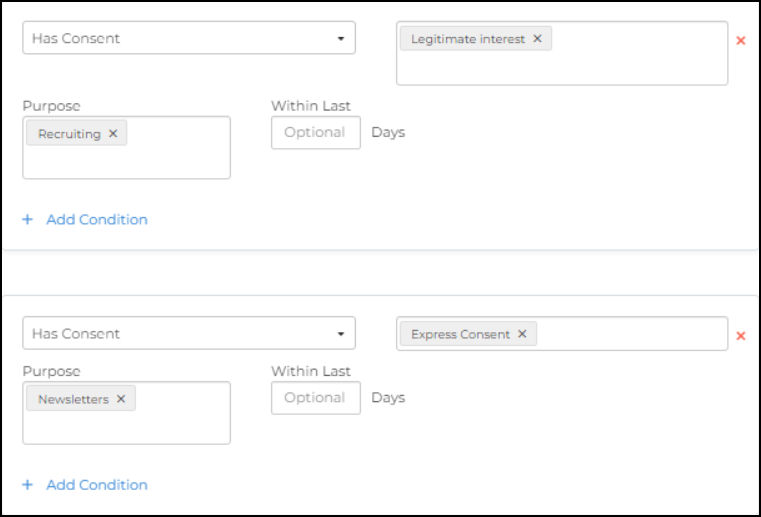
After consent is given, there are several ways to act on those records. To thank a contact for giving consent after they complete the survey, combine the Given Consent values with the Taken Engagement criteria.
Example:
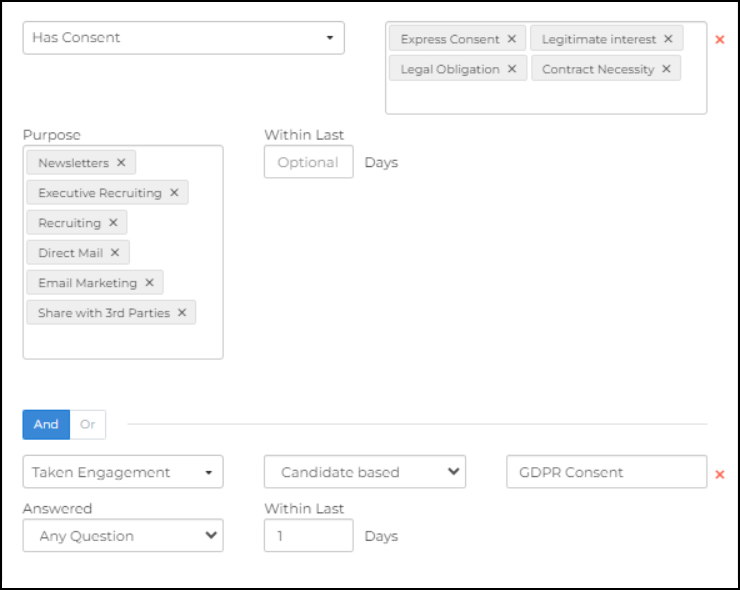
Campaign lists can also use this criteria to ensure emails are sent only to contacts who have given consent.
Example:
Consent Not Given List
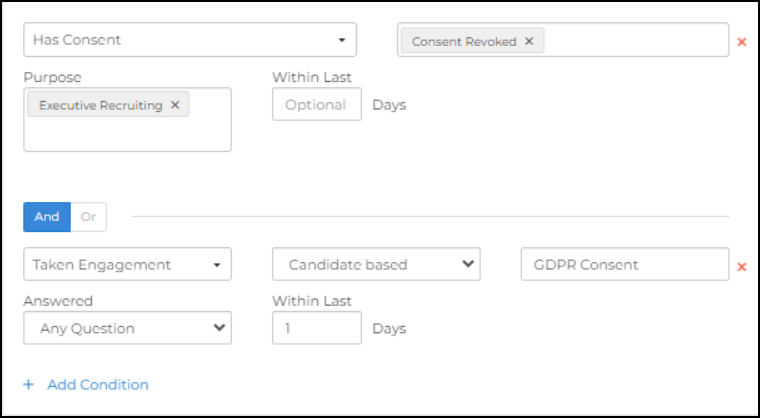
When consent is not given or is revoked, use this list to take action on those records. Most organizations send an email acknowledging the consent removal, then use an update step to archive the record and opt the contact out of further emails.
When a record is opted out, the email address is opted out at the address level, preventing a duplicate contact with the same email address from being accidentally contacted.
This List could look like this:
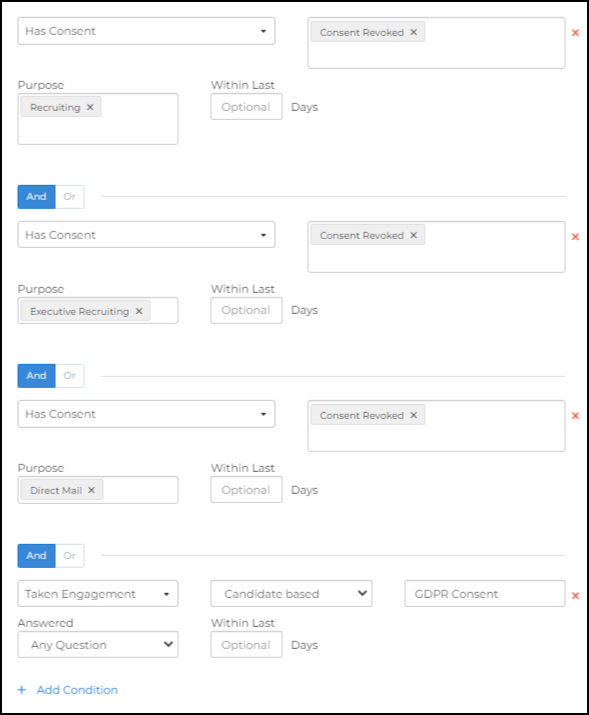
If multiple consent options are available and a contact revokes consent for all purposes, include each consent purpose in a separate condition group to correctly identify those records.
Example:
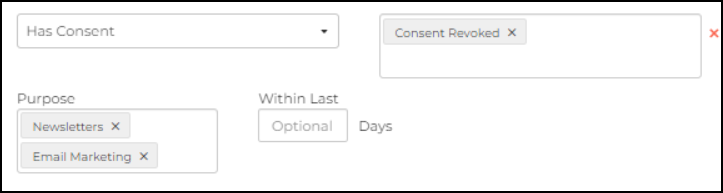
When contacts revoke consent for some purposes but not all, use a Suppression List to exclude those records from the relevant campaigns. For example, a contact may consent to recruiting information but not newsletters. For more information, see the Suppression Lists article.
Example:
Surveys
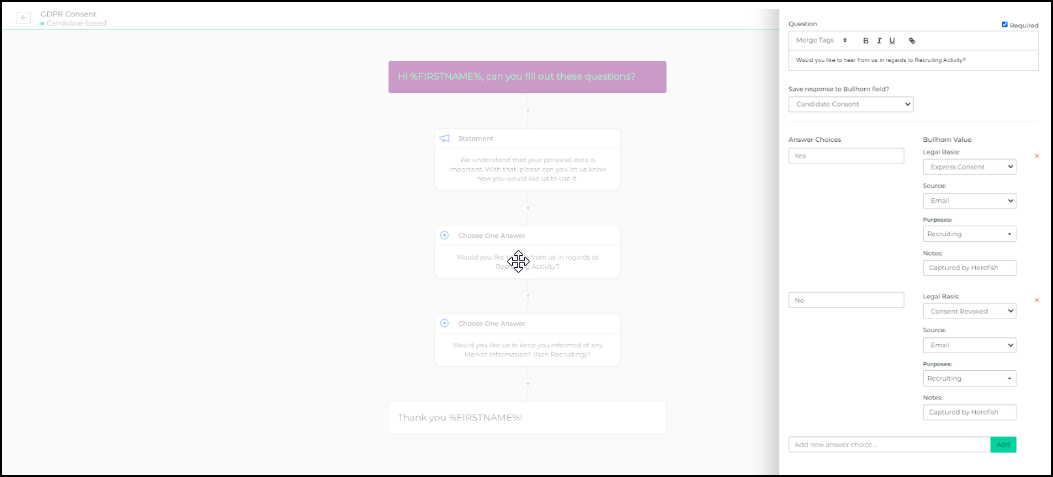
Surveys give contacts the opportunity to select their consent preferences. Those preferences are saved back to the Bullhorn ATS Consent Module, keeping consent data consistent across platforms.
The survey included in the Request Candidate Consent - GDPR Blueprint Automation is configured to save contact responses to the ATS Consent Module. Review and adjust the survey to align with your specific business processes.
A GDPR survey typically asks contacts to indicate consent separately for different purposes, such as legitimate recruiting activity versus newsletters or marketing emails.