Getting the Best Answers from Sophia
Sophia from Bullhorn makes it easier to get the support you need without waiting in line. With her built-in AI, you can quickly find answers, get troubleshooting guidance, and transfer to a live analyst when necessary.
Sophia AI Support Chat is currently available only to select customers as part of an early access program. Your organization will receive a communication from Bullhorn when Sophia is ready to be enabled for you.
Check out the demo of the two ways you can use Sophia:
Asking clear, specific questions helps Sophia deliver faster, more accurate answers. This guide shows how to phrase your questions for the best results.
Common Scenarios for Asking Sophia Questions
-
“How do I reset my password in ATS?”
-
“Why am I getting an error when I post a job?”
-
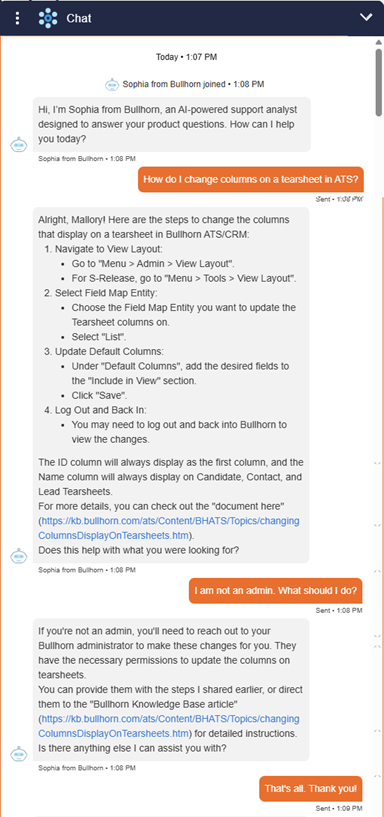
“How can I configure tearsheet columns?”
-
“What’s the best practice for setting up a department?”
-
“I need help.”
What Kind of Questions Sophia Can Answer
Sophia specializes in:
-
How-to questions about Bullhorn products.
-
Troubleshooting steps when you run into problems.
-
Best practices for getting the most out of features.
-
Administrative actions such as adding departments or industries.
Tips for Getting the Best Responses
-
Be specific and include the product or feature name.
-
Ask one question at a time.
-
Use complete sentences so Sophia can understand your intent.
-
If the first answer doesn’t solve your problem, rephrase your question or ask Sophia to refine the search.
Troubleshooting
-
If Sophia gives the wrong article: Try using more exact product names in your question.
-
If answers feel too general: Add detail about what you were doing when the issue occurred.
-
If Sophia repeats herself: Rephrase your question in different words.
-
If Sophia can’t answer: Escalate to live chat or create a case.
FAQ
Q: Can I ask Sophia multiple questions at once?
A: Yes, but ask one question at a time for the most accurate results.
Q: What if I don’t know the feature name?
A: Describe the task you’re trying to do and Sophia will still guide you.