Federal W2 Reporting in Adapt
Federal W2 Reporting contains federal tax reporting information for the corporation.
Permission for this component is granted via the manage corporation permission under the general administration category.
- Select Federal W2 Reporting in the segments drop-list.
-
The details for tax reporting are listed.
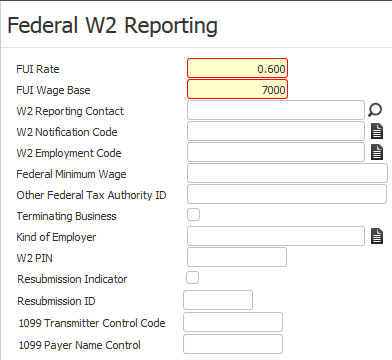
- W2 Reporting Contact is a look up to the users file; add the contact via Manage Users.
- W2 Notification Code is the preferred method of contact: email, postal service.
- W2 Employment code describes the type of business the company does: agriculture, military, regular.
- Other Federal Tax Authority ID field: Enter a Federal Tax Authority ID number if the corporation has filed under a different number during the current filing year.
- Terminating Business is selected when discontinuing business with this corporation.
- Kind of Employer indicates whether the corporation is a government or tax exempt employer.
- Resubmission Indicator and Resubmission ID are provided in case the Tax Authority requires this information.
- The final three fields are for entering a W2 PIN, 1099 Transmitter Control Code and 1099 Payer Name Control (if needed).
-
Click on the Edit button to modify the federal tax reporting information.

- While updating the form, fields marked in red are required to complete the workflow. Click on the buttons to the right of certain fields to open a new window which will allow you to search and select options related to that specific field.
-
Click Save to keep changes or Cancel to discard.

Was this helpful?