Using Generative AI to Create Amplify Prompts
This article shows you how to use generative AI to help you create high-quality saved prompts for Amplify. Instead of starting from a blank page, you can use AI tools to draft strong “starter” prompts that you can then refine for your Bullhorn workflows.
For more examples to get you started, see Amplify Custom Prompt Examples.
How to Create High-Quality Prompts
Crafting prompts from scratch can take time, especially if you're new to prompt writing. That’s why we recommend starting with Amplify Chat. It’s built right into Bullhorn, understands your ATS context, and can help you shape strong starter prompts without switching tools.
If you prefer, you can also explore ideas using other generative AI platforms such as ChatGPT, Google Gemini, or any tool you're comfortable with. These can give you helpful drafts you can then adapt for Bullhorn Amplify.
Example: Using AI to Help You Write a Prompt
To show how this works, the example below was created using Google Gemini. Even though we used Gemini for this demonstration, you can follow the exact same approach using Amplify Chat, which is usually the fastest way to generate and refine prompts directly inside Bullhorn.
Here’s the prompt we gave Gemini:
“Please create me a generative AI prompt, that if fed with a person’s CV, would anonymise or remove information on the CV, such as places of work, personal information, or anything else that would give away the identity of the candidate.”
Gemini responded with a well-structured prompt, which you'll see broken down in the next section.
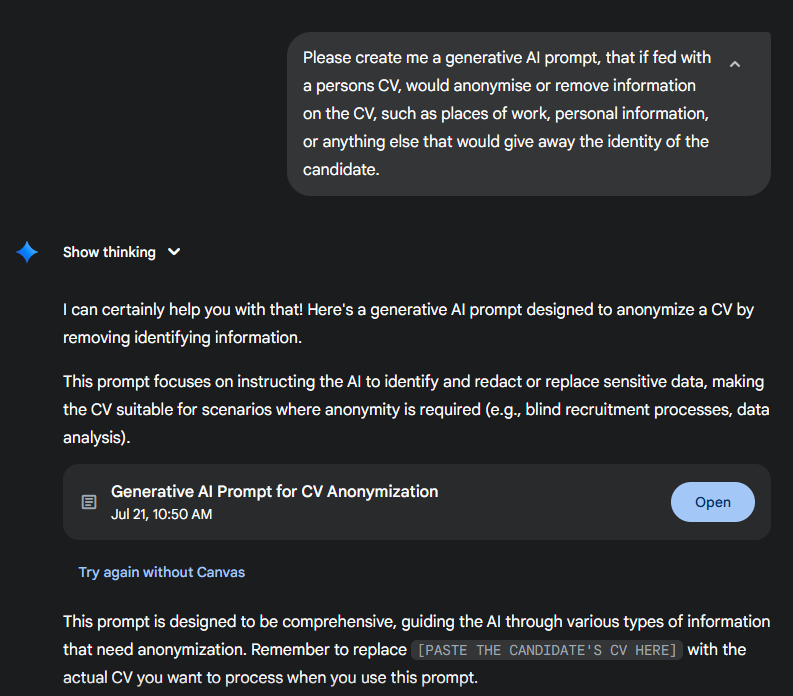
Using AI tools like Amplify Chat or other LLMs is a great way to jump-start your work. You can take the draft they generate, customize it for your specific workflow, and then create a saved prompt in the Amplify Prompt Studio.
Anatomy of an AI Prompt
Let’s break down what a strong prompt looks like and why each part is important.
Be specific! The more clearly you define your instructions, the more consistent and useful your results will be.
In the below prompt, explanations of each part of the prompt will be in RED.
Start of Prompt:
[This first section sets the context and defines the AI’s role.]
You are an expert in data privacy and document anonymization. Your task is to process a given Curriculum Vitae (CV) and remove or replace all information that could directly or indirectly identify the candidate. The goal is to create a version of the CV that retains professional experience, skills, and educational background, but completely obscures the individual's identity.
Instructions: [Gives the AI clear, structured steps to follow.]
-
Personal Identifiers: [Clear instructions, telling the LLM
 An AI language model (or LLM) is a system trained on large amounts of text that can read, interpret, and generate human-sounding language. Amplify uses one to read your Bullhorn records and produce output based on the prompts you configure. It does not search the internet or access outside data on is own. It only works with what you give it. which areas it should focus on and what to replace information with.]
-
Name: Replace with a generic placeholder like "[Candidate Name]".
-
Contact Information: Remove all phone numbers, email addresses, physical addresses, and links to personal websites or social media profiles (e.g., LinkedIn, GitHub). Replace with "[Contact Information Removed]".
-
Date of Birth/Age: Remove entirely.
-
Nationality/Citizenship: Remove entirely.
-
Gender: Remove entirely.
-
-
Employment History: [Same as above, we are being explicit in what information we want to remove or change and what information should be used to replace it.]
-
Company Names: Replace with generic placeholders like "[Company A]", "[Company B]", "[Previous Employer 1]", etc. Ensure each unique company is assigned a unique placeholder if the candidate worked for the same company multiple times.
-
Specific Project/Client Names: If any project or client names are highly specific and could indirectly identify the candidate or their former employer, replace them with generic descriptions (e.g., "[Confidential Project]", "[Client in Finance Sector]").
-
Dates of Employment: Retain the start and end years (e.g., "2018 - 2022") but remove specific months or days if present. If only years are provided, keep them as is.
-
-
Education:
-
Institution Names: Replace with generic placeholders like "[University X]", "[College Y]", "[Educational Institution 1]", etc.
-
Dates of Attendance/Graduation: Retain the start and end years (e.g., "2014 - 2018") but remove specific months or days.
-
Specific Course/Thesis Titles: If a title is highly unique and could lead to identification, generalize it (e.g., "Master's Thesis on [Topic Area]").
-
-
Other Sections:
-
References: Remove any mention of "References available upon request" or actual reference contact details.
-
Awards/Achievements: If an award is highly specific and publicly linked to a unique individual, generalize its description or remove the specific name of the award if it's too identifying.
-
Volunteer Experience/Extracurricular Activities: Anonymize organization names and specific roles similar to employment history.
-
Hobbies/Interests: Remove any highly unique or niche hobbies that could potentially identify the individual. General interests (e.g., "reading," "hiking") can remain.
-
Output Format: [Clear instructions in how you want the output to be presented.]
Present the anonymized CV in a clear, readable format, maintaining the original structure (sections, bullet points) as much as possible. Use the specified placeholders for removed or replaced information.
END of Prompt
Test and Refine
The example above may look complex, but it’s perfectly fine to simplify your prompts depending on your use case.
That’s why the Amplify Prompt Studio includes a prompt testing area. You can test your prompts in real time and using real data to ensure they’re generating the results you expect. Tweak, refine, improve, then reuse with confidence.