Enrich From Note Automation Step
-
You need Bullhorn Amplify Edition to use this feature.
-
This feature is currently Early Access.
The Enrich From Note automation step lets you automatically transfer information from call notes, interview summaries, and other note content into candidate ATS fields, ensuring that valuable information is made searchable and reportable. This automates the note enrichment available when manually adding or editing a note in the ATS, so you can process notes in bulk and apply enrichment to historic records without reviewing each note individually.
For information about the version of this feature in Bullhorn ATS, see Enrich Records from Notes.
How it Works
When a candidate record enters the Enrich From Note step, Amplify:
-
Looks for the most recent note on the candidate record that matches the configured note action type(s), where the candidate is listed in the About field.
-
Extracts structured data from the note text and evaluates each suggested field update against your configured confidence threshold.
-
Configure Enrich fields and confidence settings in ATS under Admin > Amplify Admin > Entity Settings > Enrich Fields
-
-
Applies any updates that meet or exceed the threshold to the candidate record automatically.
If no matching note is found, the candidate is skipped for that step.
Using the Enrich From Note Step
You can use the Enrich From Note step in the following automation types:
-
Candidate automations
-
Placement automations (candidate contact type only)
-
Submission automations (candidate contact type only)
Place the step at the desired point in your automation workflow and configure the settings as outlined below.
Enrich From Note Step Settings
Select Note Action
Choose which note action type(s) the step should look for. The step uses the most recent note on the candidate record that matches one of the selected action types, where the candidate appears in the About field.
Notes where the candidate appears under Additional References are not considered. The candidate must be listed in the About field on the note.
You can select multiple note action types. If more than one matches, the most recently added note is used. If no matching note is found, the candidate is skipped.
If different note types contain different data you want to capture, consider splitting enrichment into separate steps, one per note type (e.g. a step configured for screening notes and another for interview notes). This ensures the most recent note of each type is captured rather than only the most recent note overall. For example, if a candidate has both a recent screening note and a recent interview note, both are enriched rather than just whichever was added last.
When to Update
Set the confidence threshold for applying extracted data to the candidate record. Only fields where Amplify's confidence meets or exceeds the selected level are updated.
| Option | What it means |
|---|---|
|
High confidence or higher (default) |
Only applies updates Amplify is most certain about. Fewer updates, higher accuracy. |
|
Medium confidence or higher |
Applies updates Amplify considers likely. A balance between coverage and accuracy. |
|
Low confidence or higher |
Applies all updates Amplify detects. More fields updated, with a higher chance of inaccuracy. |
Which fields are available for extraction depends on your Enrich Fields configuration in Amplify Admin. See Configuring Enrich Fields for more information.
On Failed Request
Configure what happens if the step is unable to process the note. You can choose to send a notification when this occurs.
Configuring Enrich Fields
Admin users can configure which fields Amplify should enrich from notes. You can select up to 20 fields for each entity, including custom fields.
The fields configured here apply to both the Enrich From Note automation step and the note enrichment available when a user manually adds or edits a note in Bullhorn ATS.
See Enrich Records from Notes for full configuration steps.
To configure available fields:
-
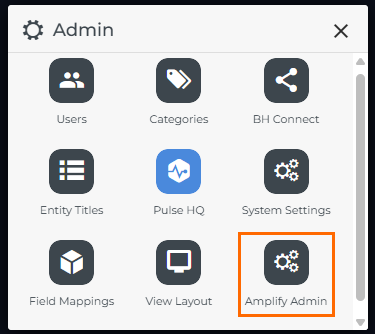
Go to Menu > Admin > Amplify Admin
-
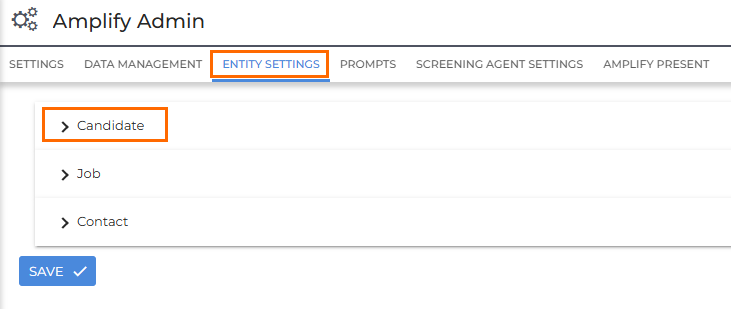
Click the Entity Settings tab.
-
Expand the section for the entity you want to configure.
-
Under Enrich Fields, review the current list. You can add, remove, or edit fields as needed.
-
If you don't see a list of fields, make sure Note Enrichment is toggled to the ON position.
-
-
After making any changes, click Save.
If a field has Auto-check enabled, the Enrich From Note step will automatically update it when a high-confidence update is detected, overwriting whatever was previously in the field. If there are fields you do not want this step to update automatically, make sure Auto-check is switched off for those fields in Amplify Admin.
Troubleshooting
For troubleshooting common issues with the Enrich from Note step, see Enrich From Note Troubleshooting.
FAQ
Which note action types should I select?
Select the action types that are most likely to contain structured candidate information, such as intake call notes or interview summaries. The step only processes notes that match the action types you configure, so choosing relevant types helps ensure the right notes are used.
What fields can the Enrich from Note step update?
The fields available for extraction are determined by your Enrich Fields configuration in Amplify Admin. An admin can configure up to 20 fields per entity, including custom fields. See Configuring Enrich Fields for setup steps.
What happens if no matching note is found?
If no note is found that matches the selected action type(s) with the candidate in the About field, the candidate is skipped for that step.
What is the difference between the confidence threshold options?
Amplify assigns a confidence level to each piece of data it extracts from a note. The When to Update setting controls the minimum confidence level required for a field to be updated:
-
High applies the fewest updates but with the greatest accuracy.
-
Medium balances coverage and accuracy.
-
Low applies the most updates but increases the risk of inaccurate data being written to candidate fields.
If you're not sure which to use, start with High confidence or higher and adjust from there.
How is the Enrich from Note step different from enriching a candidate from a note manually in the ATS?
When you add or edit a note manually in the ATS, Amplify suggests field updates and you choose which ones to apply before saving. The Enrich From Note automation step applies the same extraction automatically, based on the confidence threshold you configure. There is no manual review step, and updates are applied directly to the candidate record. This makes it well suited for processing notes in bulk or applying enrichment to historic records.
How can I tell what the Enrich From Note step updated on a candidate record?
To see what was changed, check the Edit History on the candidate's Activity tab. Updates applied by the Enrich From Note step are attributed to the Automation API User.
Why did the Enrich from Note step not update a record as expected?
Check the following:
-
The fields you expect to update are included in your Enrich Fields configuration in Amplify Admin.
-
The note matches one of the selected action types and the candidate is listed in the About field (not Additional References).
-
The extracted value met or exceeded the configured confidence threshold.