| Edition: All Editions | Audience: All Users |
OneView Metric Clickthroughs and Deeplinking
Metric Clickthroughs
You can click on any metric in OneView to view the underlying data details over the selected time period, e.g. This Month.

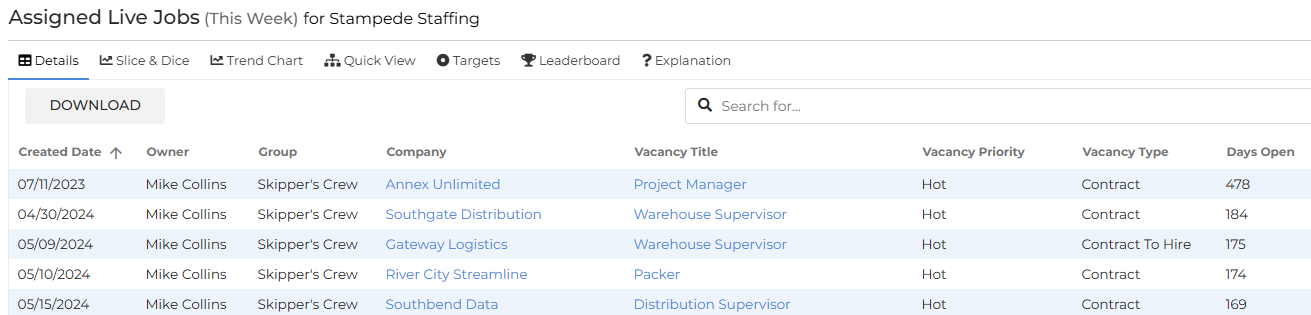
The data is presented as a set of columns (defined by your administrator) containing relevant information such as Created Dates, Client / Candidate names, Job Titles, and lots more.
Every column is sortable, and there is a search bar at the top of the page which will pick up any piece of data you search for, from any column.
Each metric has a specific selection of columns containing the most pertinent details. The option to Download clickthrough data into CSV is a specific permission enabled by your administrator on a per user basis.
Deeplinking
Once you access the data details in the clickthrough, you’ll see that some of the data in the columns presented are hyperlinked. Clicking these links will take you to the relevant record in your Bullhorn ATS in a new tab. In the example below, the link would take you to the Warehouse Supervisor job record:
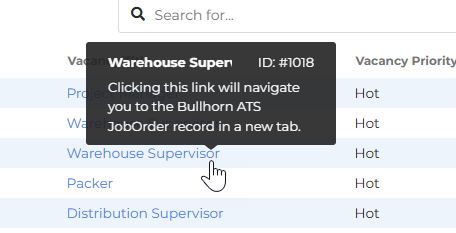
Deep Linking is present in all clickthroughs across the Bullhorn Analytics system.