| Edition: Growth, Corporate, Enterprise | Audience: All Users |
Total and Weighted Pipeline Values
For Perm/Direct Hire pipelines, Jobs Pipeline can provide you with a Total Pipeline Value as long as salary and fee percentages are entered against the Job/Vacancy in Bullhorn ATS.
How Total and Weighted Values are Calculated
If a salary and fee percentage is added, the Expected Value of the job / vacancy will be calculated using Salary x Fee Percentage. The aggregate of these values will give you the Total Pipeline Value.
Each milestone of the workflow can be given a percentage value. For example, CV Sent/Client Submission could be assigned with 15%, meaning that for a job / vacancy with a £10000 Expected Value, the Weighted Expected Value would be £1500.
As the Candidate progresses to 1st Interview, the Expected Value will increase to e.g. 60%. The aggregate of these values will give you the Weighted Pipeline Value.
The values for each milestone are determined by your Bullhorn Analytics Administrator.
See Configuring Jobs Pipeline Stages for more information on setting milestone values.
Viewing Total and Weighted Values
The Weighted Pipeline Value and Total Pipeline Value will update as you change the latest activity parameters.
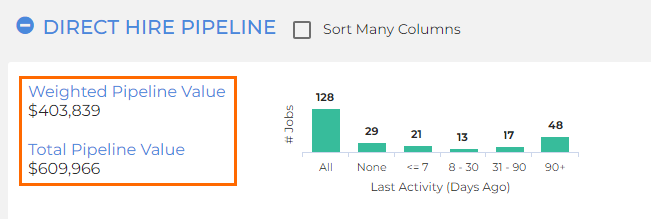
- Weighted Pipeline Value: The sum of all Weighted Expected Values
- Total Pipeline Value: The sum of all Expected Values
Click the  icon and select Exp. Value, Weight, and Weighted Exp. Value from the menu options to view these columns for each job / vacancy in the pipeline.
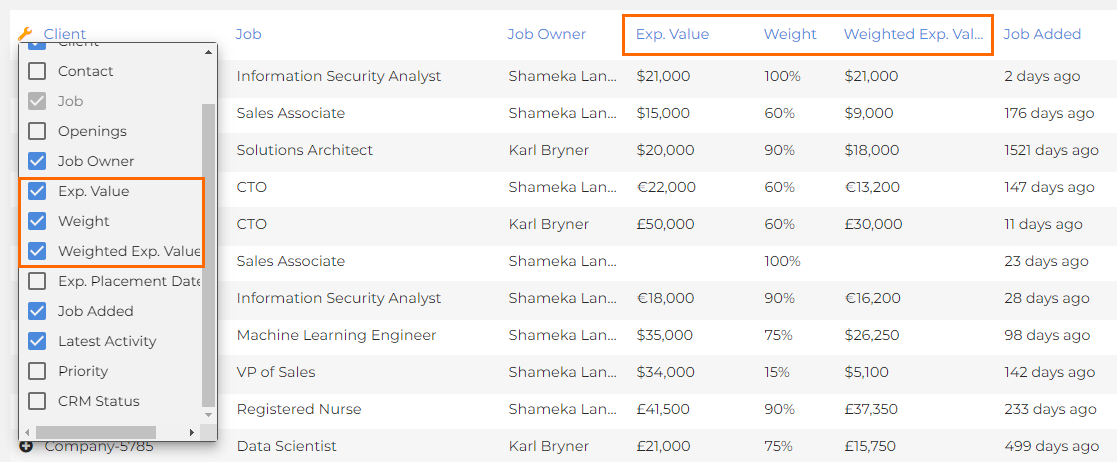
- Exp. Value: Total potential Placement value
- Weight: The percentage applied based on the furthest milestone a Candidate in the process has reached
- Weighted Exp. Value: Exp. Value x Weight (e.g. $15,000 x 0.6 (60%) = $9,000)
Contract / Temp Pipelines
For Contract / Temp pipelines, the Expected Value is not pulled through natively into Jobs Pipeline, but you can (with the permission activated) enter and save an expected value manually against the job / vacancy.
If you have and populate a "total value" field in Bullhorn ATS for Contract/Temp, Bullhorn Analytics can pull this data through automatically. Please ask your administrator to contact Bullhorn Analytics Support for help setting this up.