Add Benefit Program
- From the Benefit Program page, click Add.
-
The following screen displays:
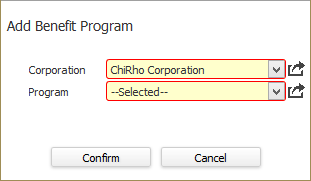
- In the Corporation field, select the Corporation associated with the program to which you are enrolling the employee. The list is filtered by corporations added to the Employee's Payroll Tax record. This field is REQUIRED.
- In the Program field, select the Program to which you are enrolling the employee. The droplist is filtered by the Corporation field and only shows Programs associated with the selected Corporation.
- When you are satisfied with your selections, click Confirm.
- The Eligibility Participation segment of the Eligibility Participation record displays. (See Eligibility Participation.)
Was this helpful?