Eligibility Participation
Whenever an Employee is enrolled into an eligibility program, an Employee Participation Record is created which tracks the employee’s process toward triggering the program, accruing hours and earning payouts. Note: Benefit calculations take place upon the post of a timecard or when a recalculation is performed. There are two ways to access the Employee Participation Record:
- As part of the Enroll Individual Employee workflow.
- By accessing the Candidate record, selecting Employee Financial, clicking on the Benefit Programs segment, selecting the program (by clicking on the radio button in the left column of the row of the program) and clicking View/Edit.
The Employee Participation record has 2 main segments: Eligibility Participation and Eligibility History.
The Eligibility Participation segment displays basic information about the employee’s participation in the selected program. For the most part, it is read-only as it is designed to only display information.
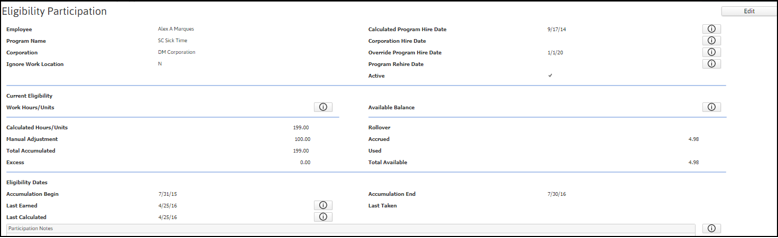
| Field | Description |
|---|---|
| Employee | The Employee's full name. |
| Program Name | The name of the Program to which the Employee is enrolled. |
| Corporation | The corporation associated with the Program to which the Employee is enrolled. |
| Calculated Program Hire Date | This is the date that the system has determined is the beginning point for calculating the employee’s eligibility for the program. If there are posted timecards associated with the program, the system uses the work begin date of the first posted timecard for the earliest assignment with the work location in the eligibility program. If there are no posted timecards, the system uses the first assignment date associated with the program's corporation, regardless of work location. This field is updated during the Posting process. The Adjusted Hire Date field overrides this field. |
| Corporation Hire Date | This date can be set in the Employee's Payroll Tax Record for the Corporation. If populated, it sets the beginning of the initial accumulation period for hire date programs. If this field is empty, the Calculated Hire Date will be used. |
| Override Program Hire Date |
Override Program Hire Date - This is the date used to set when to begin the initial program waiting period. |
| Program Rehire Date | This date can be filled in when the Employee has been Rehired after a period of time and the Program needs to be restarted. If populated, the current program accumulation period will be ended with no rollover or balances carried forward. If you do not wish to restart the program, then this field should be left blank. Note:This only applies to Anniversary and Hire Date programs. |
| Active |
If the box is checked, then the employee is actively participating in the program. As long as the program is active and within the accumulation period, the employee will earn hours toward the program award. If the employee’s participation is inactive, nothing is accumulated. You can edit this field by clicking in the checkbox to toggle it between checked (active) and unchecked (not active) If the award is a one-time award (indicated by the Auto-End After Award flag on the Program Accrual/Award segment of the Eligibility Record in Administration), once a timecard on which the award is included is posted, the Active flag automatically changes to unchecked (not active) on the Employee Participation record. If the check that includes the timecard on which the award is included is voided, the Active flag will automatically reset back to checked (active). |
| Current Eligibility - Work Hours/Units | This section contains statistics showing accumulated hours for this employee on this eligibility program. It also allows you to make adjustments to the accumulated hours. This section is made up of the following fields:
|
| Current Eligibility - Available Balance | This section contains information about the amount of incentive earned, used and available. This section is made up of the following fields:
|
| Eligibility Dates | This section contains calculated dates based on actions taken concerning the eligibility program. This section is made up of the following fields:
|
| Participation Notes | This is a free form field that allows you to enter additional information pertaining to this employee’s participation in the program. |