| Edition: Enterprise | Audience: All Users |
Saving a Slice & Dice Report
Slice & Dice reports can be saved, downloaded, and shared, depending on your user permissions. This means that the value of great insights that you or a colleague have created can be realised across the business and a shared pool of reporting can be built.
Saving a Report
To save a report, click the Save Report button in the main option array.

A popup will appear for you to give the report a name. Make sure you enter a unique name, or a red warning message will appear.
If you would like to save a new iteration of an existing report with the same name, you must first delete the existing saved report. This will allow you to save the new version under the same name.
Accessing Saved Reports
Click the Saved Reports button in the bottom left corner of the screen to open a list all of the Slice & Dice reports you have saved, and those which have been shared with you and your group.

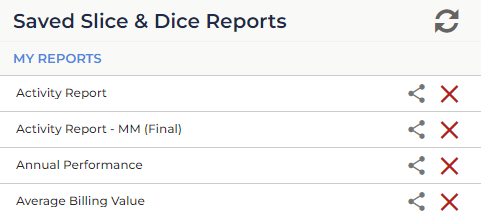
- Refresh button (
 ): This refreshes the list of Saved Reports and will include any new reports that have been shared with you.
 - Share button (
 ): This opens an interface allowing you to share your report with other users or groups. See Sharing a Slice & Dice Report for more information.
 - Delete button (
 ): This deletes the selected Slice & Dice report.