Viewing Candidate Details
Use the Candidate Panel to see key details and take quick actions without opening the full candidate record. This helps you review profiles, check activity, and make faster decisions.
You'll typically use the Candidate Panel when you want to:
- Review a candidate's resume and background before contacting them.
- Check application history.
- See recruiter notes or interview feedback tied to a candidate record.
Viewing Candidate Details
The Candidate Panel gives you a streamlined view of the most relevant candidate information.
To open it:
- Click the binoculars (
 )icon next to a candidate's name.
- The panel opens on the right side of the page.
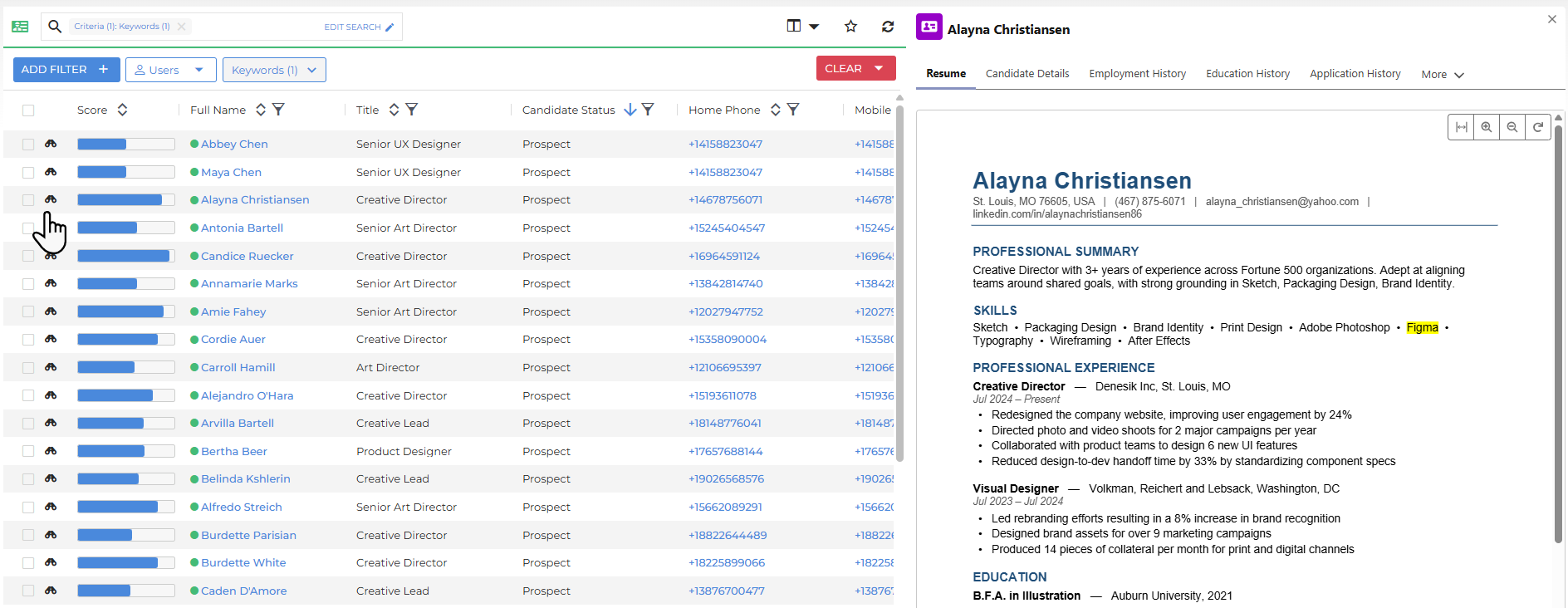
Inside the panel you can view:
- Resume: See the candidate's resume, if available. Keywords that match your search are highlighted.
- Candidate Details: A condensed summary of candidate information.
- Employment History: View work history.
- Education History: View education history.
- Application History: View application history.
- Documents: View any uploaded documents.
- Power Notes: Review notes logged against the candidate record.
To open the full candidate record, click the candidate's name in the list.
Was this helpful?