| Edition: All Editions | Audience: All Users |
Track Offers in Bullhorn Analytics
Offers are tracked via the Shortlist section in Bullhorn ATS. Your Bullhorn Analytics system can track different Shortlist statuses as Offers, so that each time you set a Shortlist to a certain status (such as "Offer" or "Offer Extended") it adds an Offer in Bullhorn Analytics.
You can decide which Shortlist statuses you'd like to count as an Offer in Analytics. By default, the statuses "Offer" and "Offer Extended" are recognized as Offers and will show in relevant Offers metrics.
If you'd like Analytics to recognize another Shortlist status as an Offer, contact Support to have the new status mapped in.
Steps to Track an Offer
- Navigate to the Shortlist section in Bullhorn ATS.
- Change the Shortlist Status to one of the statuses your Bullhorn Analytics system recognizes as an Offer.
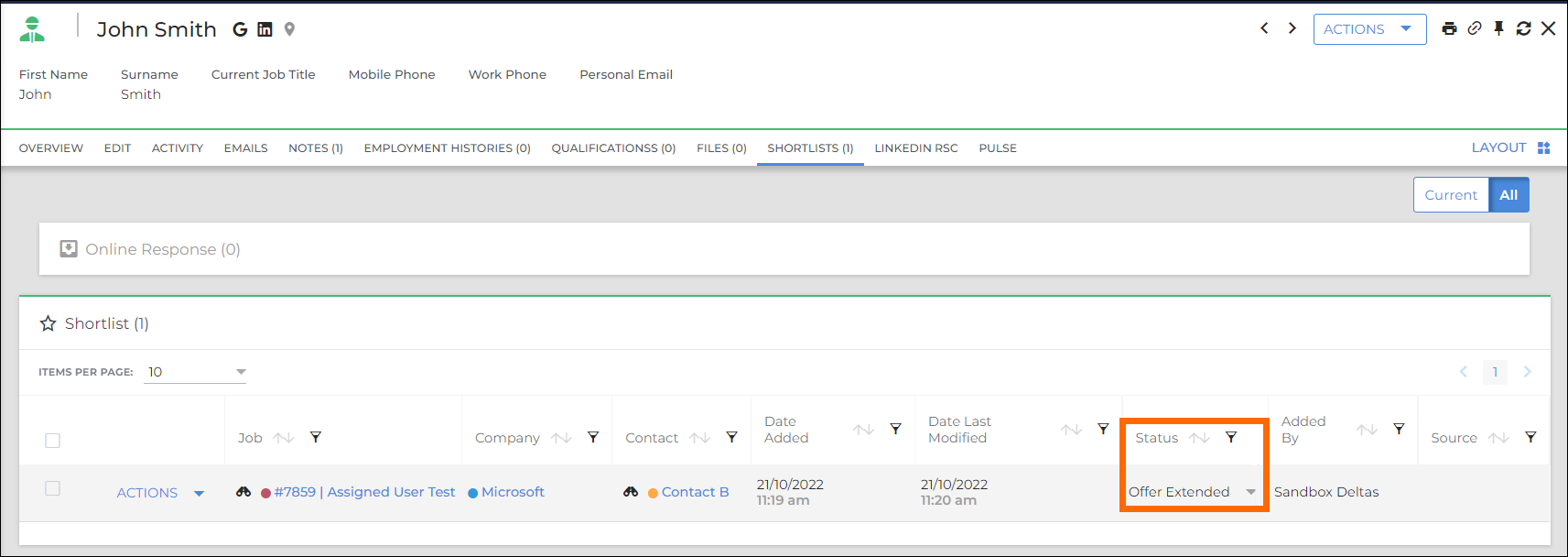
- After saving this change, the Offer will be fed to Analytics and will show in the relevant Offers metrics.
Was this helpful?