Best Practices for Building High-Performance Lists
Well-designed lists are critical to keeping automations fast, reliable, and predictable in Bullhorn Automation. The way you structure list criteria directly impacts processing time, system load, and the accuracy of your automation results.
This article outlines proven best practices to help you build efficient lists, avoid performance bottlenecks, and make your automations easier to maintain over time.
Test List Criteria Before Saving
Before saving and syncing a list, always test your criteria using Create a List via Advanced Search. Advanced Search on the Contacts tab behaves the same as the List Builder but gives you immediate visibility into how many records match your criteria and whether your logic produces the expected results.
Testing helps you:
-
Validate that you are using the correct fields and operators
-
Compare similar fields that may return different results
-
Catch overly broad or overly restrictive logic before syncing
Consider using ATS ID > Is > [test record #] to first run the automation using only test records, then remove that criteria once you're satisfied with the results. Once you confirm the list behaves as expected, remove the test condition before enabling the list for production use.
Common Scenarios to Test
-
Comparing candidate-based lists versus placement-based lists when working with active placements
-
Evaluating similar fields such as Has Note versus Last Note Date
-
Segmenting an existing list using In List combined with AND or OR logic
-
Confirming how date-based filters include records before or after a specific date
Use Multiple Values in a Single Field
When filtering on the same field with multiple values, always place those values into a single value box rather than creating multiple conditions with an ‘OR’ operator, each value listed in the single field will be treated as or example, status is ‘Active’ or ‘Placed’.
This approach reduces the number of checks the system has to perform and improves list performance.
Add multiple values into one field and press Tab after each value.
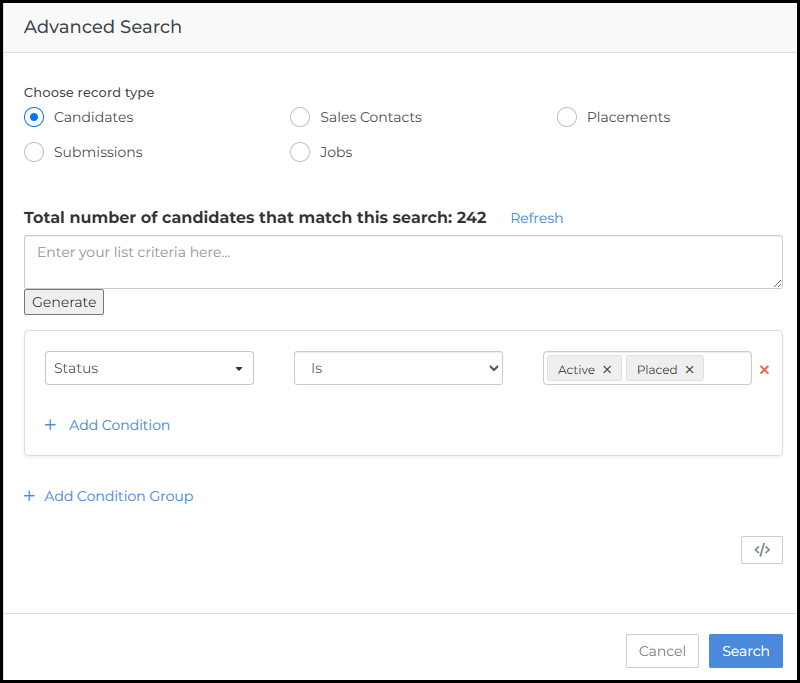
Avoid creating separate conditions for each value on the same field.

Choose the Fastest Operators First
The operator you choose can have an impact on list performance. Some operators allow Bullhorn Automation to jump directly to matching records, while others require scanning large portions of your database.
Use “Is” Over “Starts With” or “Contains”
Is (exact match) is the fastest operator because the system can immediately locate matching records.
Use Is whenever you know the exact value you want, such as:
-
Status Is Active
-
Type Is Employee
-
Source Is Referral
-
Is performs a direct match
-
Starts With must check the beginning of each value
-
Contains must scan every character in every record
Use “Starts With” Over “Contains”
When an exact match is not possible, Starts With is significantly more efficient than Contains.
-
Contains forces the system to read every character of every record, similar to reading every resume word-by-word to find “Java”
-
Starts With allows the system to jump directly to matching entries, like flipping to the “J” section in an alphabetized file cabinet
Use Contains only when necessary.
Use Positive Filters Over Negative Filters
Whenever possible, filter for what you want, not what you want to exclude.
-
Status Is Active
-
Avoid when possible:
-
Status Is Not Inactive
Positive filters allow the system to quickly retrieve matching records. Negative filters require the system to examine every record to confirm it does not match the excluded value, which takes more time.
Build Conditions in the Right Order
Bullhorn Automation evaluates list conditions in the order you build them. Each condition reduces the data set for the next one, so ordering matters.
Apply conditions in this order for the best performance:
-
Exact matches (Is, In List, IDs)
-
Date-based filters
-
More complex or slower filters (Contains, Does Not Contain, Has Note)
This ensures slower conditions only run against a smaller subset of records rather than your entire database.
Keep Lists Focused and Purpose-Built
Broad lists that return extremely large numbers of records take longer to process and can slow down automations.
-
Include only the criteria required for the automation’s purpose
-
Narrow lists over time as data stabilizes
If you are auditing email addresses, you may initially need to scan all existing records. After the initial cleanup, adjust the list to target newly created or recently updated records instead of repeatedly reprocessing historical data.
Avoid Self-Referencing List Dependencies
Lists A collection of ATS records that meets specified criteria, such as a scheduled end date or a low NPS response. should never directly or indirectly depend on each other in a circular way.
Self-referencing lists can create long or infinite processing loops, which cause delayed list updates, long sync times, and difficulty diagnosing automation issues.
-
Design lists to operate independently.
-
Avoid configurations where two lists check for each other’s membership.
-
Example to avoid:
-
List A checks whether a record exists in List B
-
List B checks whether a record exists in List A
-
Use Always-Updated Lists for Automations
One-time lists are useful for snapshots and reporting, but they do not update as records change.
-
Use Always Updated Lists for automations that need to respond to new or updated data
-
Reserve one-time lists for ad-hoc analysis or reporting comparisons
Build Lists in Advanced Search, Not Inside Automations
Although lists can be created from the Automations section, Advanced Search offers clear advantages.
Create and test lists in Advanced Search, then reference them in automations.
This allows you to:
-
Test criteria before syncing
-
See record counts immediately
-
Avoid repeated navigation between Lists and Automations to troubleshoot logic
Choose the Correct Entity for Your Goal
Some entities can produce multiple records per person, which can cause unintended repeat automation runs.
Carefully consider the entity you are building your list on.
-
A single candidate can have multiple submission records.
-
If a candidate has seven submissions and your list is built on the Submission entity, the automation may run seven times for that candidate.
-
If the intended outcome is to update the candidate record once, this can result in duplicate updates, errors, or unexpected behavior.
-
In this scenario, building the list on the Candidate entity is typically more appropriate.
Avoid Editing Lists Attached to Active Automations
Editing a list that is currently attached to a running automation will pause that automation. You must manually re-enable the automation after saving the list changes.
To avoid accidental pauses, build and finalize your list criteria before attaching the list to an automation. If you need to make changes to a live list, be prepared to re-enable any automations attached to it after saving.
Always Exclude Hard Bounces from Your List
Including contacts with hard-bounced email addresses inflates your list count and skews your view of how many contacts are actually eligible to receive communications.
Add an Exclude Hard Bounces qualifier to any list used in an automation that sends email. This gives you an accurate count of contactable records before the automation runs.
High-performing lists:
-
Use exact and positive filters whenever possible
-
Minimize broad, negative, or text-scanning operators
-
Apply conditions in an efficient order
-
Target the correct entity and data scope
-
Avoid circular dependencies
-
Stay focused on a single, clear purpose
Following these best practices helps ensure your automations run faster, scale better, and remain easier to manage as your database grows.