Log a Candidate Call
The Log a Call workflow allows the user to document a phone conversation with the candidate.
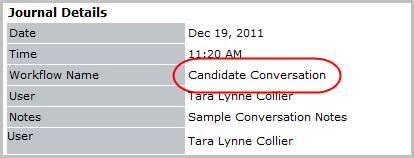
- Select Log a Call from the Calls and Emails menu in the Activities drop-list.
- The Log a Call workflow opens in a new window. While updating the form notice that fields marked in red are required to complete the workflow; and that by clicking on the buttons to the right of certain fields, a new window will open, allowing you to search and select options related to that specific field, or choose a date.
- Enter a JO # to associate the call with a specific job order; a journal entry created from the workflow will be added to the job order’s journal.
-
Select the Type of Call icon to choose the call result: Conversation, Left Message, No Answer or Wrong Number.
Call type Wrong Number will launch an email to the candidate requesting updated contact information once the Log a Call workflow is complete.
- Select theOutcomeicon to choose the results (or outcome) of the call. The options available are set up separately for Candidate (including Supplier Candidate) and Contact (including Supplier Contact) using the Manage Lists functionality in the Administration area of Adapt.
- Enter the Available Date and Available Note to update these fields on the candidate’s summary segment. These are quick glance fields recruiters use to ascertain the availability status.
- Select the Schedule Internal Interview box to launch the schedule internal interview workflow once the log a call workflow is complete.
- Enter Notes regarding the call in the open text notes box.
- Schedule a Follow-up reminder with an alert by entering the date and time to follow-up; the notes entered in the above step will be added to the follow-up task.
-
Click Confirm to complete the workflow. The activity details will be saved and will be available for reporting purpose.
-
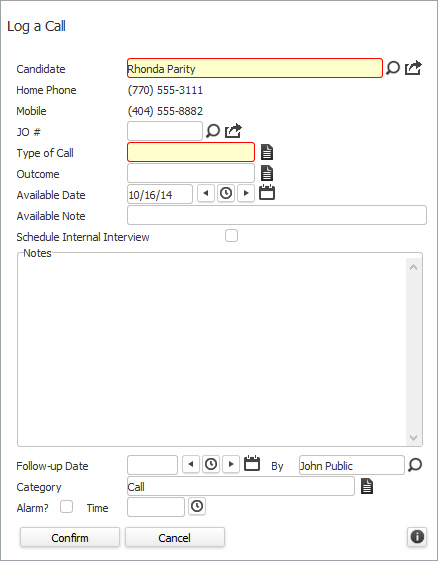
Verify the Candidate Conversation entry and notes are posted to the journal.
The journal entry name will change to reflect the type of call chosen in the workflow.