Present to Client (Assignment)
Use this workflow to advise the Client that potential Candidates are available to fill the Job Order.
-
Select Present to Client from the Assignment Activities menu from the Activities drop-list.
You must select at least one Candidate on the Submittal Tracking segment to present from the list box prior to starting the workflow.
-
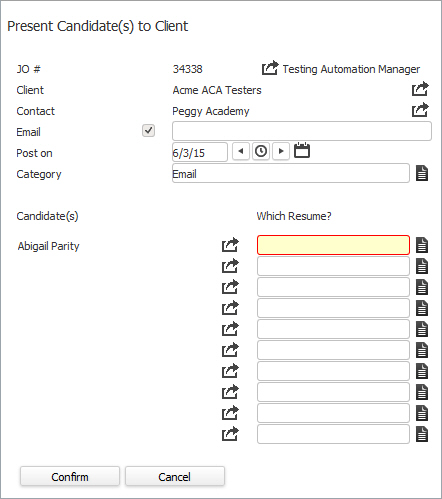
The Present Candidate(s) to Client workflow will open in a new window.
The candidates must have a Resume to continue with this workflow.The checkbox before the Email field allows you to indicate whether you want Adapt to generate an email. A check indicates you want the email. An empty box indicates you do not want the email.
- Choose which Resume to email to the client; by clicking on the buttons to the right of certain fields, a new window will appear that will let you search and find information for that specific field.
-
Click Confirm to complete the workflow.
-
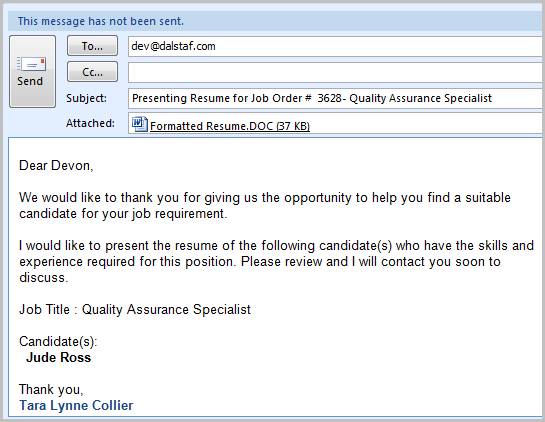
After confirming the workflow a pre-formatted email will open, with the Candidate(s) Resume(s) attached, ready to send to the Client.
-
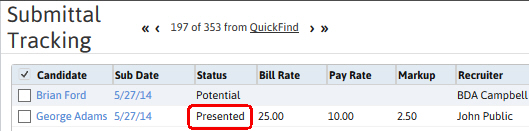
The Candidate's submittal status will be updated to Presented.
-
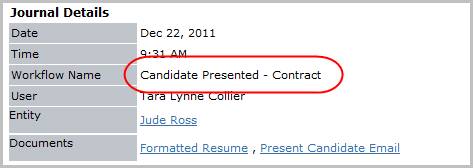
Check the journal to confirm the Candidate Presented entries were posted. The activity details will be saved and will be available for reporting purpose.