Update Submitted Rates
Use this workflow to correct or update the rates on the candidate’s submittal.
-
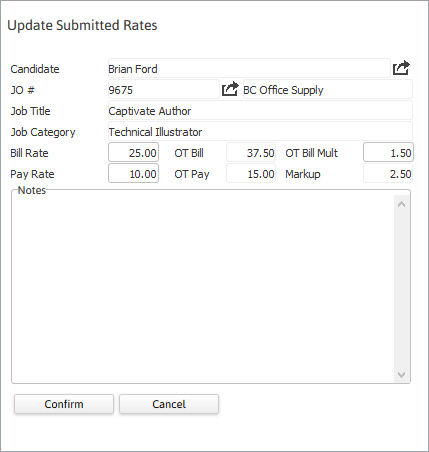
Select Update Submitted Rates in the Assignment Activities menu from the Activities drop-list.
You must select a Candidate to submit from the Submittal Tracking segment prior to starting the workflow.
- The Update Submitted Rates workflow will open in a new window.
- The Bill and Pay Rates are populated from the submittal record and changing the rates does not affect the job order and will be reflected in the submittal record for this candidate only.
- Enter notes, as needed.
-
Click Confirm to complete the workflow.
- The Submittal Tracking segment will refresh with the submittal rates updated.
-
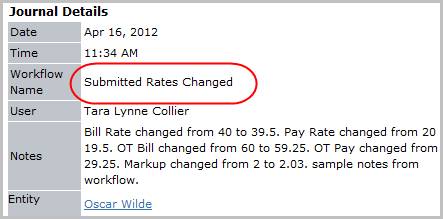
Verify the Submitted Rates Changed entry and notes from workflow are posted to the journal.
Was this helpful?