Enabling Amplify Chat
You need Bullhorn Amplify Edition to use this feature.
Amplify Chat is a conversational AI interface that lets you query, analyze, and act on information across your entire Bullhorn environment.
Amplify Admins control who can access Amplify Chat within Bullhorn.
Once enabled, users can open Amplify Chat directly from the top navigation bar or through the main menu.
Enable Access to Amplify Chat
-
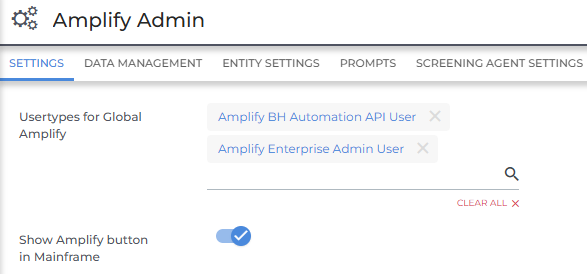
Go to Admin > Amplify Admin > Settings.
-
Use the following options to enable Amplify Chat:
-
Usertypes for Global Amplify: Enable Amplify Chat for specific user types.
-
Users for Amplify Chat: Enable Amplify Chat for individual users.
-
-
(Optional) Toggle on Show Amplify Button in Mainframe to display the Amplify icon in the top navigation bar.
-
If you don't enable this option, users will still be able to access Amplify Chat via Menu > Amplify.
-
-
Click Save to apply your changes.
-
Limit Amplify Chat access to specific users or user types if you want to control usage or support a phased rollout.
-
If users do not see the Amplify icon, confirm that their user or user type has access to Amplify Chat and that the Show Amplify Button in Mainframe setting is turned on.
-
Amplify respects Bullhorn permissions. If a user can’t see certain data in Bullhorn ATS, they won’t be able to see it through Amplify either.