Amplify Prospect in Chat
Amplify Prospect is one of the tools you can use in Amplify Chat. Select it when you want Amplify to research companies and opportunities for you, then take action on what it finds without leaving the chat.
This article gives you ideas for using Prospect in Amplify Chat, with example prompts you can adapt.
To learn more about Amplify Prospect outside of Chat, see Amplify Prospect
Selecting the Prospect Tool
To tell Amplify to use Prospect for your request, type / in the chat field and select Bullhorn Prospect from the list. Then finish typing your request and send it.
For example:
“Find me some fintech companies in London /Prospect”
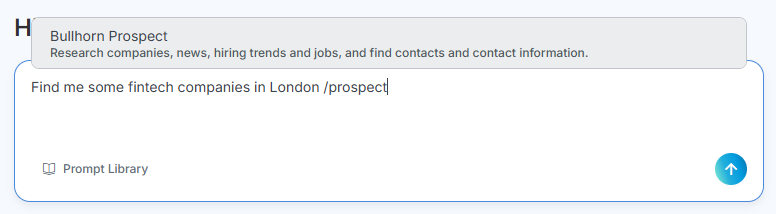
Selecting the tool directs Amplify to use Prospect rather than deciding for itself which tool is the best fit.
You can also select more than one tool in a single request. For more on selecting tools, see Accessing and Navigating Amplify Chat.
Ideas for Using Prospect in Chat
Research Companies in a Specific Industry
Use Prospect to build a list of companies that fit a market you want to target.
Example prompts:
-
“Find me some fintech companies in London /Prospect”
-
“Research healthcare staffing clients in [location] /Prospect”
Add Researched Companies to Bullhorn
Once Amplify has found companies, you can add them to Bullhorn without retyping anything. Follow up in the same conversation:
“Add records for all of those companies in Bullhorn.”
Amplify shows you a short form where you can choose whether to create new records for all of them, or check for duplicates first and only create the missing ones. You also choose which status the new records get. Amplify then shows a preview of each record, and nothing is added until you approve it.
You can add up to 25 records at a time. For the full steps, see Taking Action on Records with Amplify Chat.
Find Contacts at a Company
After you’ve identified a company you want to work with, use Prospect to find the people you should be talking to there, then add them to Bullhorn as contacts.
Example prompts:
-
“Find hiring managers and HR leaders at [company name] /Prospect”
-
“Add those people as contacts in Bullhorn.”
You can add up to 25 records at a time. For the full steps, see Taking Action on Records with Amplify Chat.
Combine Prospect with Other Tools
Prospect works well alongside the other tools in Amplify Chat. For example, you could research companies with Prospect, then ask Amplify to check your Bullhorn ATS data to see which of them you already work with.
Tips
-
Be specific. Include an industry, location, or company size to narrow the results.
-
Continue the conversation. Ask follow-up questions to refine the results before you add anything to Bullhorn.
-
Review before you approve. Amplify always shows a preview before records are created.
For more on writing effective requests, see Amplify Chat Best Practices.