Screening Summary
A Screening Summary is generated after a candidate completes their screening. The report is emailed to
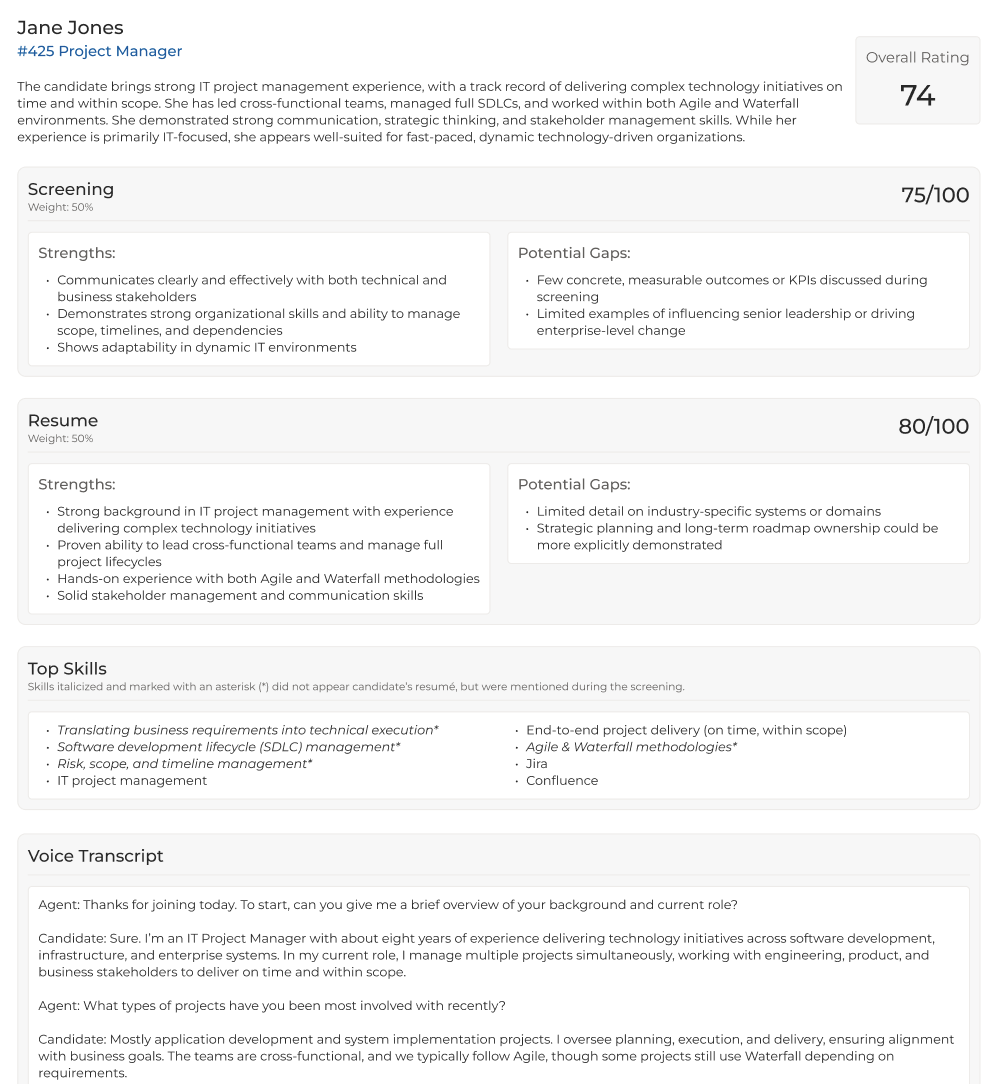
The Screening Summary provides a clear, structured view of a candidate’s screening results, making it easy to quickly identify strengths, potential gaps, and top skills.
Candidates do not receive a copy of the report or their score.
What’s Included in the Screening Summary
When a candidate finishes the screening in full, the summary contains:
-
The candidate’s overall screening score
-
A conversation summary and analysis of their responses
-
Strengths and potential gaps identified during the screening
-
Resume-based strengths and potential gaps related to the job
-
A list of top skills demonstrated, including skills not found on the resume
-
A complete transcript
The example below shows a typical summary for a completed screening:
How the Summary is Organized
For completed screenings, the report is structured into three core sections: Screening, Resume, and Top Skills. In addition, you’ll find a brief overview, a transcript, and the candidate’s overall score.
Screening
Insights from the candidate’s responses, divided into Strengths and Potential Gaps. The screening receives a score out of 100, which makes up 50% of the candidate’s overall score by default*.
Resume
Relevant Strengths and Potential Gaps identified in the candidate’s resume in relation to the job. The resume also receives a score out of 100, which makes up 50% of the candidate’s overall score by default*.
If the candidate does not have data in their Resume field, then the screening score will be used for the overall score.
Top Skills
A combined view of the skills the candidate demonstrated in the screening and the skills found in their resume.
Skills mentioned during the screening but not present on the resume are marked with an asterisk. This is a great opportunity to update the resume with additional relevant skills.
*
Understanding the Overall Score
The overall score at the top of the screening summary
-
Skills and knowledge demonstrated in the screening
-
Relevant experience in the resume
-
Results of any knockout questions
-
Any additional scoring logic you configured in the screener engagement
For a deeper explanation of scoring, see Understanding Your Candidate’s AI Screening Score.
The
Incomplete Screenings and Anomalies
Incomplete Screenings
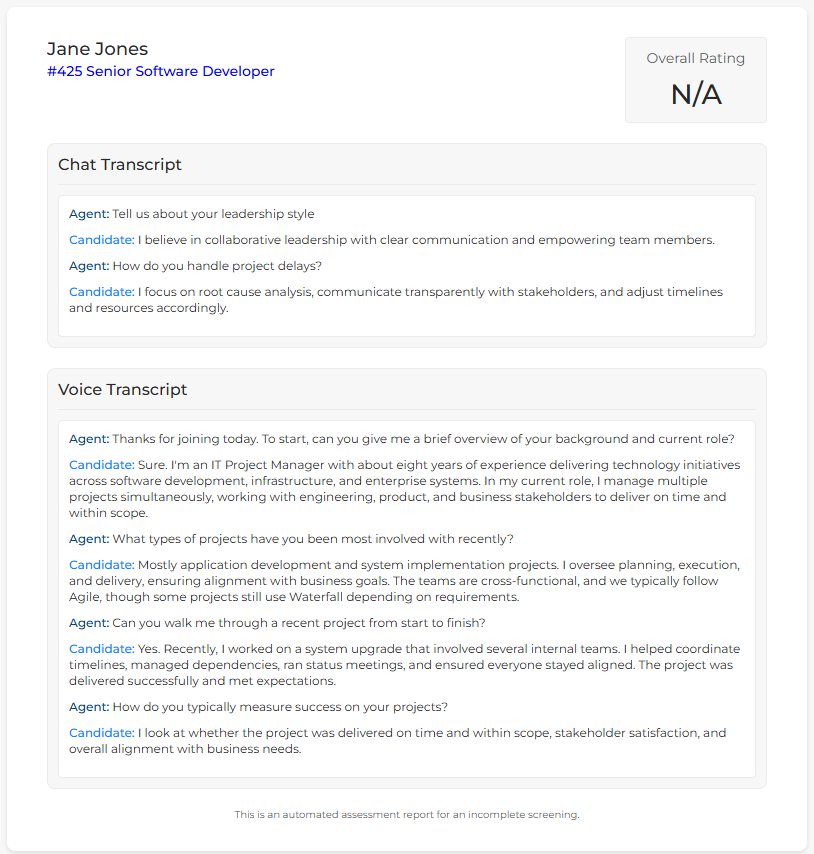
If the candidate starts a screening but does not complete it, a partial summary is generated that includes only the chat and/or voice transcript (if applicable).
-
No overall score is provided
-
No strengths, potential gaps, or top skills appear, as the AI does not have enough information to perform this analysis
The example below shows what the Summary looks like for an incomplete screening:
Detected Anomalies
If the system identifies an anomaly such as a mismatch between screening performance and resume content (for example, a resume unrelated to the job), the summary will attempt to highlight this so you can make an informed decision.
The example below shows how the summary displays a mismatch between screening performance and resume content. In this fictional example, the candidate demonstrated relevant strengths during the screening, but those strengths were not reflected in their resume.
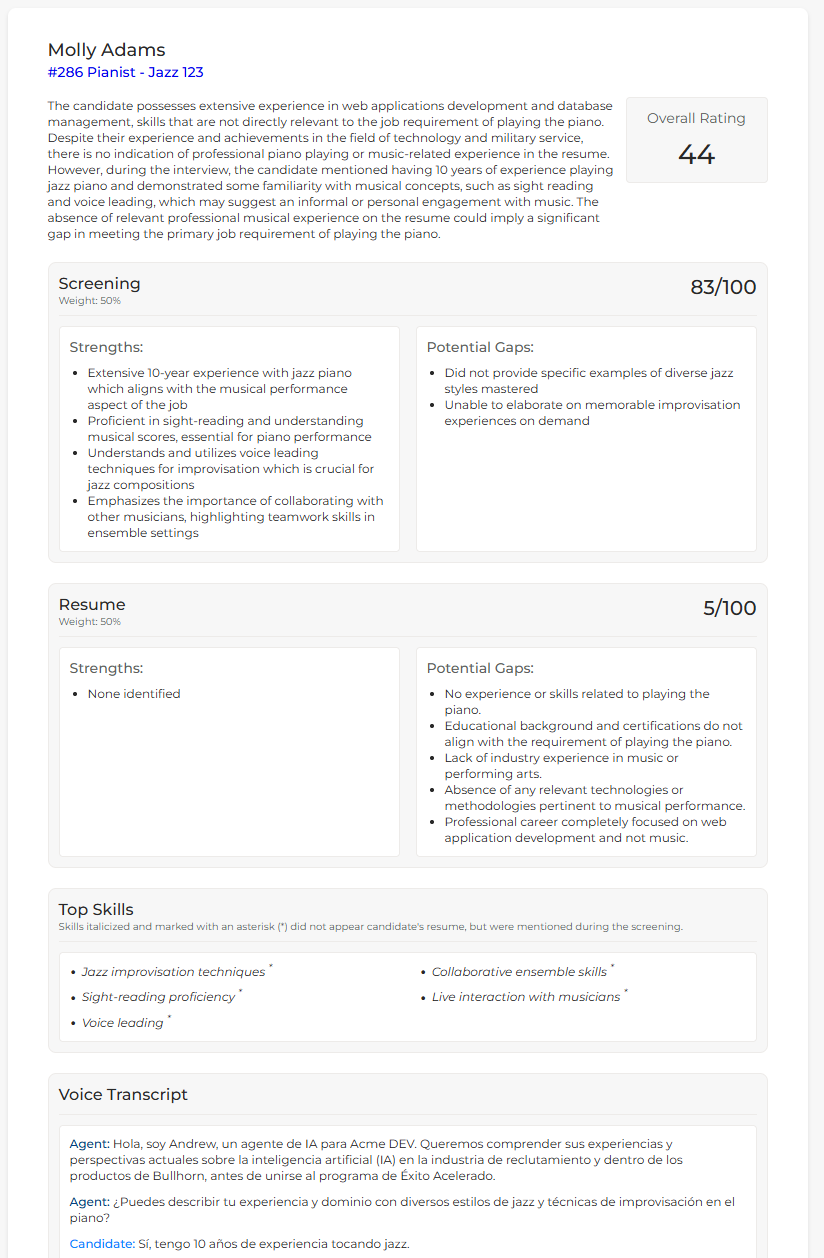
These examples illustrate edge-case scenarios and are not representative of real screening results.