Amplify Screener Additional Scoring Instructions
When setting up the Amplify screener, you can add additional scoring instructions to complement Bullhorn Automation’s standard scoring logic. This allows you to fine-tune how evaluations are calculated so that candidate scores better reflect your organization's priorities.
Additional Scoring Instructions: Usage and Limitations
How It Works
Custom instructions are applied in addition to the Amplify Screener's standard scoring logic, not as a replacement. The AI considers your guidance alongside existing evaluation criteria.
For more detail on the default scoring logic, see Understanding Your Candidate's Screening Score.
What You Can Try
Here are some examples of additional instructions you might include for your screener:
-
Put heavier score consideration on chat responses to knockout questions
-
Increase score weighting for “Must Haves” listed in the job description
-
Decrease a candidate’s score if they were silent or did not answer a question
Important Limitations:
-
Variable AI Interpretation: Results will vary as instructions are subject to AI interpretation. We cannot predict exactly how your instructions will be applied in every case.
-
Mathematical Operations: You can try using weight percentages or +/- point values (for example, "-10 for no response"), and the AI does appear to take these into account. However, because there's no transparent mathematical formula in our scoring system, we cannot verify whether specific point adjustments were applied or measure their impact.
Recommendation: Use additional instructions as general guidance to highlight your evaluation priorities, rather than expecting precise, formula-based scoring adjustments.
How to Add Additional Scoring Instructions
To add additional scoring instructions to the Amplify Screener:
-
Open your screener engagement.
-
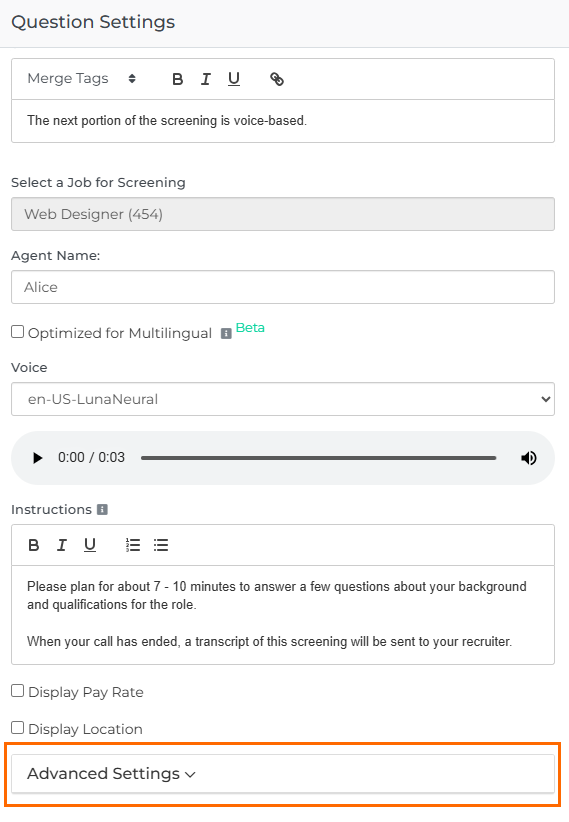
Click on the Screener question to open the Question Settings panel.
-
Click to expand the Advanced Settings dropdown.
-
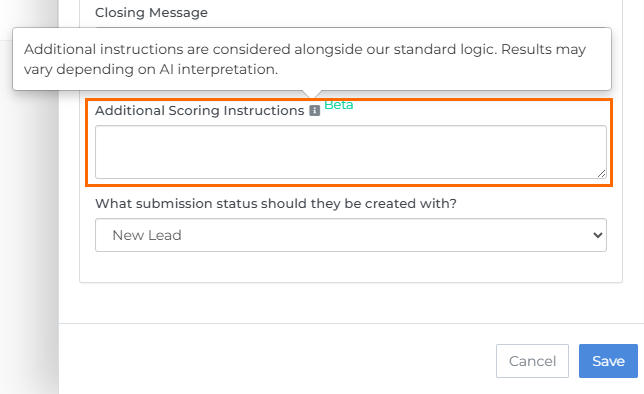
Enter your custom scoring criteria in the Additional Scoring Instructions field.
-
Save your changes.