LinkedIn Apply Connect Overview
LinkedIn Apply Connect makes it easier to post your Bullhorn jobs to LinkedIn and bring applicants directly back into your ATS, with no manual uploads or extra steps required.
This article provides an overview of how the integration works, what’s included, and how to get help if you run into issues.
For troubleshooting, see LinkedIn Integration Troubleshooting.
What Is LinkedIn Apply Connect?
LinkedIn Apply Connect is an integration between Bullhorn ATS and LinkedIn. It syncs jobs from your Bullhorn account to your LinkedIn Company Page and brings applications from LinkedIn directly into Bullhorn.
The integration includes two main features, each with specific LinkedIn license requirements:
- Easy Apply: Syncs jobs from Bullhorn to LinkedIn and delivers candidates who apply via LinkedIn directly into Bullhorn as submissions. Requires both a LinkedIn Agency Account with Job Slots and a LinkedIn Recruiter Professional (RPS or RPS+) license. Disabling RPS will break Easy Apply entirely.
- Applicant Insight: Displays applicant insights within Bullhorn and allows feedback sharing between Bullhorn and LinkedIn.
- Requires a LinkedIn Recruiter Professional (RPS or RPS+) or LinkedIn Recruiter Corporate license.
If LinkedIn Recruiter System Connect (RSC) is enabled, recruiters also receive all standard RSC benefits for Easy Apply applicants.
What LinkedIn Apply Connect Does
LinkedIn Apply Connect includes the following capabilities:
-
Near real-time job syncing between Bullhorn and LinkedIn
-
Easy Apply enabled on LinkedIn for synced jobs
-
Automatic delivery of LinkedIn applications directly into Bullhorn ATS.
-
See Reviewing LinkedIn Web Responses for more information.
-
-
LinkedIn Profile Widget to view candidate insights and LinkedIn profile data in Bullhorn
-
Requires a LinkedIn Recruiter Professional (RPS or RPS+) or LinkedIn Recruiter Corporate license.
-
-
Automatic applicant notifications in LinkedIn as candidates move through your Bullhorn workflow
-
Requires a LinkedIn Recruiter Professional (RPS or RPS+) or LinkedIn Recruiter Corporate license.
-
Who Can Use LinkedIn Apply Connect
LinkedIn Apply Connect is available for the following Bullhorn ATS editions and LinkedIn account types:
-
Available for all Bullhorn ATS editions except ATS Growth (formerly Team edition)
-
No cost from Bullhorn. LinkedIn licensing may apply depending on enabled features.
-
For more detail, see LinkedIn’s Jobs from Search and Staffing Companies FAQ
-
To enable this feature, please contact Bullhorn Support.
How Job Wrapping Affects Job Publishing
Job Wrapping is a LinkedIn-side function configured between your organization and LinkedIn Support that determines whether jobs pushed via Apply Connect are published on LinkedIn's job board. Bullhorn does not configure or manage Job Wrapping.
Changes to your LinkedIn Job Wrapping setup (such as modifying or deleting a LinkedIn dashboard) can cause jobs to stop publishing even when sync from Bullhorn is working correctly. If jobs sync from Bullhorn but do not appear on LinkedIn, contact LinkedIn Support to verify your Job Wrapping configuration.
For more information, see Job Wrapping on LinkedIn.
How Jobs Sync Between Bullhorn and LinkedIn
While this integration is a two-way sync, Bullhorn is the system of record for job data. Any change made to a Bullhorn job (including closing, publishing, or unpublishing) automatically syncs to LinkedIn. Publish or Unpublish triggers the synchronization or removal of the job from the job board.
To be eligible for syncing, the following Bullhorn job fields must be populated:
| Bullhorn Field | Field Description | Required? |
|---|---|---|
| Job ID | Unique identifier for the job in Bullhorn. | Yes |
| title | Job name in Bullhorn | Yes |
| Public description | The public description of the job (minimum 100 characters) | Yes |
| isOpen | Job status (Open or Closed) | Yes |
| createdAt | Date created in Bullhorn | Yes |
| City/State OR City/Country | Job location | Yes |
| Country Code | Country code for the job. | Yes |
| Zip Code | Postal code for the job. | Yes |
|
skills |
Desired skills and experience |
Optional |
|
categories |
Job categories. Bullhorn sends up to ten categories to LinkedIn. |
Optional |
|
IsPublic |
Controls where the job syncs on LinkedIn and Bullhorn job board. Must equal 1 for sync to occur. |
Yes |
Job status labels do not control LinkedIn syncing. Status labels in Bullhorn (such as "Active" or "On Hold") have no effect on whether a job syncs to LinkedIn. Only the isOpen and isPublic field values determine sync eligibility. A job syncs to LinkedIn when isOpen is true and isPublic equals 1. Sync is triggered by field changes in Bullhorn. LinkedIn does not perform scheduled job refreshes.
Unsupported fields: The following are not transmitted to LinkedIn and are not supported by LinkedIn Apply Connect:
- Screening questions
- Compensation and salary fields
- Custom text fields (customText)
To request support for additional fields, submit a Bullhorn feature request.
LinkedIn Job IDs and Task URNs assigned to synced jobs are not stored in Bullhorn. These are LinkedIn-side identifiers and cannot be retrieved from within Bullhorn.
How to Configure Your Career Portal Domain
LinkedIn requires a public URL with a {?} placeholder that Bullhorn replaces with the Job ID when sending individual job links to LinkedIn. For example: https://example.com/jobs/{?}. This URL is configured as the Career Portal Domain Root for your integration.
- If your organization does not have a universal URL format, use the jobPostingUrl field on each Job record to manually enter a URL for that specific job.
- Bullhorn does not support non-numeric characters appended to Job IDs by third-party systems. For example, if a content management system appends "-2" to a Job ID, those jobs will not sync correctly.
Viewing LinkedIn Profiles in Bullhorn (LinkedIn Widget)
The LinkedIn Widget in Bullhorn lets you view a candidate’s LinkedIn profile and related insights directly from the candidate's submission record. Within this panel, you can see how the applicant’s experience aligns with the associated job and access LinkedIn-powered data to better evaluate candidate quality.
Requires a LinkedIn Recruiter Professional (RPS or RPS+) or LinkedIn Recruiter Corporate license.
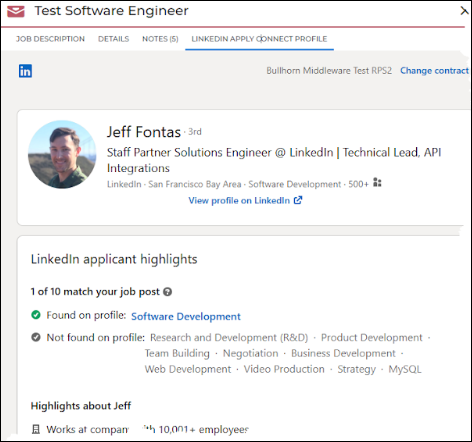
To view a LinkedIn candidate profile in Bullhorn:
- Go to Menu > Submissions.
-
Select the relevant candidate, then click Submissions/Web Responses .
-
Click the Binoculars icon next to the candidate’s name.
-
Open the LinkedIn Apply Connect tab to view profile insights and matching data.
Viewing Bullhorn Candidates in LinkedIn
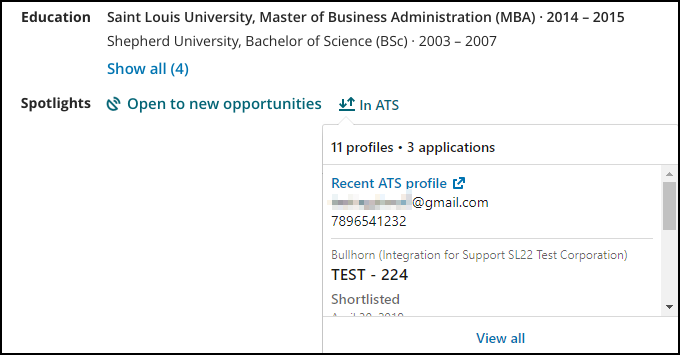
When viewing a LinkedIn profile that is synced with a Bullhorn candidate record, you’ll see an In Bullhorn ATS (or In ATS) indicator in LinkedIn Recruiter.
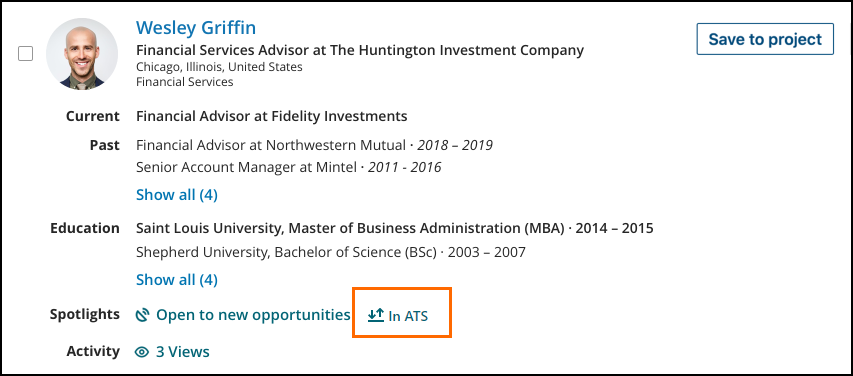
Click this indicator to view the candidate’s past submissions and ATS statuses directly from LinkedIn.
How Candidates Receive Application Status Updates
When LinkedIn Apply Connect is enabled, candidates automatically receive status updates within LinkedIn as their application moves through your Bullhorn workflow. These notifications are triggered by specific activities in Bullhorn ATS.
| LinkedIn Status | Triggering Activity |
|---|---|
| Application Viewed |
The applicant’s submission status changes from a Web Response to another status. For more information, see Application Viewed. |
| Resume Downloaded |
A recruiter downloads and views the applicant’s resume from their submission. For more information, see Resume Downloaded. |
| Application Rejected |
The applicant’s submission status changes to a rejected status. Rejected statuses are managed under the system setting rejectedJobResponseStatus. For more information, see Application Rejected. |
Who to Contact When Something Goes Wrong
If you experience issues with your LinkedIn Apply Connect integration, here’s how to know who to contact:
Contact Bullhorn Support For
-
Jobs not showing on 1-Click Export
-
Candidates exported to ATS not appearing in Bullhorn
-
InMail notes or messages not syncing
-
Jobs published in Bullhorn not appearing on LinkedIn
-
LinkedIn applications not flowing into Bullhorn
Contact LinkedIn Support Directly For
Create a LinkedIn Support ticket here.
-
Apply Connect enablement issues
-
Company name not appearing in dropdown
-
Contract or cost-related questions
-
Job slot or mapping questions
-
Recruiter account configuration issues
-
LinkedIn RSC or Apply Connect feature inquiries