How Radius Search Works in Bullhorn ATS
Radius search lets you filter a list view for records such as candidates or jobs that fall within a chosen distance of a specific address or area. To use it, apply an address filter to a list view and select Radius as the operator — then enter your location and distance. This article explains how Bullhorn calculates those location results and why some records may or may not appear in your search.
How the System Determines Location
When you perform a radius search, Bullhorn converts your search location into centralized latitude and longitude coordinates. This becomes the starting point for your radius.
Each record in Bullhorn also has its own coordinates, which are generated based on:
-
A valid ZIP / postal code, or
-
A valid city and state (if no ZIP / postal code is available)
If a record cannot generate coordinates, it cannot be included in radius search results.
How the Radius is Calculated
To determine which records fall within your selected radius, Bullhorn:
-
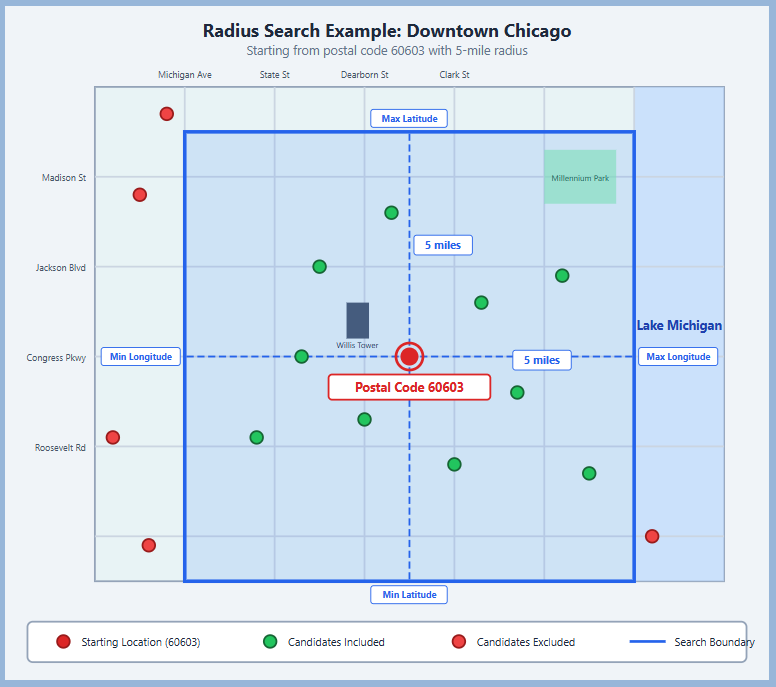
Calculates the maximum and minimum latitude and longitude values based on your chosen radius.
-
Creates a square boundary around your search location using these values.
-
Returns all records whose coordinates fall within that boundary.
Example of a radius search:
Important Notes
-
Only records with valid location data (ZIP / postal code or city and state) can appear in radius results.
-
Records missing this information will not appear in results.
-
You can improve accuracy by ensuring the records in your database have clean, up-to-date address information.