Automations Tab
The Automations tab is where you manage and monitor all automations in Bullhorn Automation. Automations follow "if this happens, do that" logic — this tab gives you a full view of their status and performance.
Navigating the Automations Tab
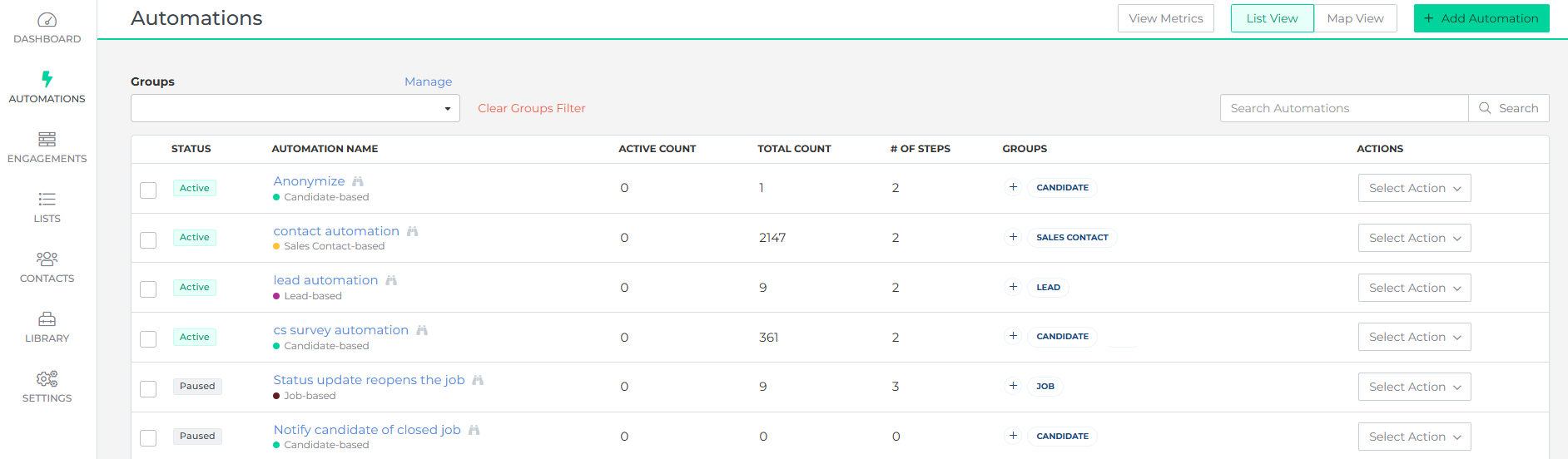
The Automations tab displays all automations in your account. Use the Search field to find a specific automation, or click Create New Automation to build a new one.
The list contains the following columns:
- STATUS: The current status of the automation (active, paused, etc.).
- AUTOMATION NAME: The unique name given to each automation.
- ACTIVE COUNT: The number of contacts currently moving through the automation.
- TOTAL COUNT: The combined count of contacts who are currently active or have completed the automation.
- # OF STEPS: The number of steps in the automation.
- GROUPS: The groups or entities the automation targets.
- ACTIONS: Contains options to manage individual automations:
- View Metrics: View detailed performance data for the automation.
- Copy Automation: Duplicate an existing automation.
- Delete Automation: Remove an automation. There is no undo.
- Edit Groups: Modify the groups the automation targets.
Creating New Automations
Click Create New Automation to start building a new automation. For a step-by-step guide, see Creating an Automation and Configuring Settings.
Was this helpful?