VMS Sync: Worksites / Locations
When Use Company Worksites is enabled, matches positions to Bullhorn Location records instead of ClientCorporation records. Each Location stores a reference to its parent ClientCorporation. The Company Mapping dashboard populates with Bullhorn Locations, and all manual and auto-linking applies to Location records.
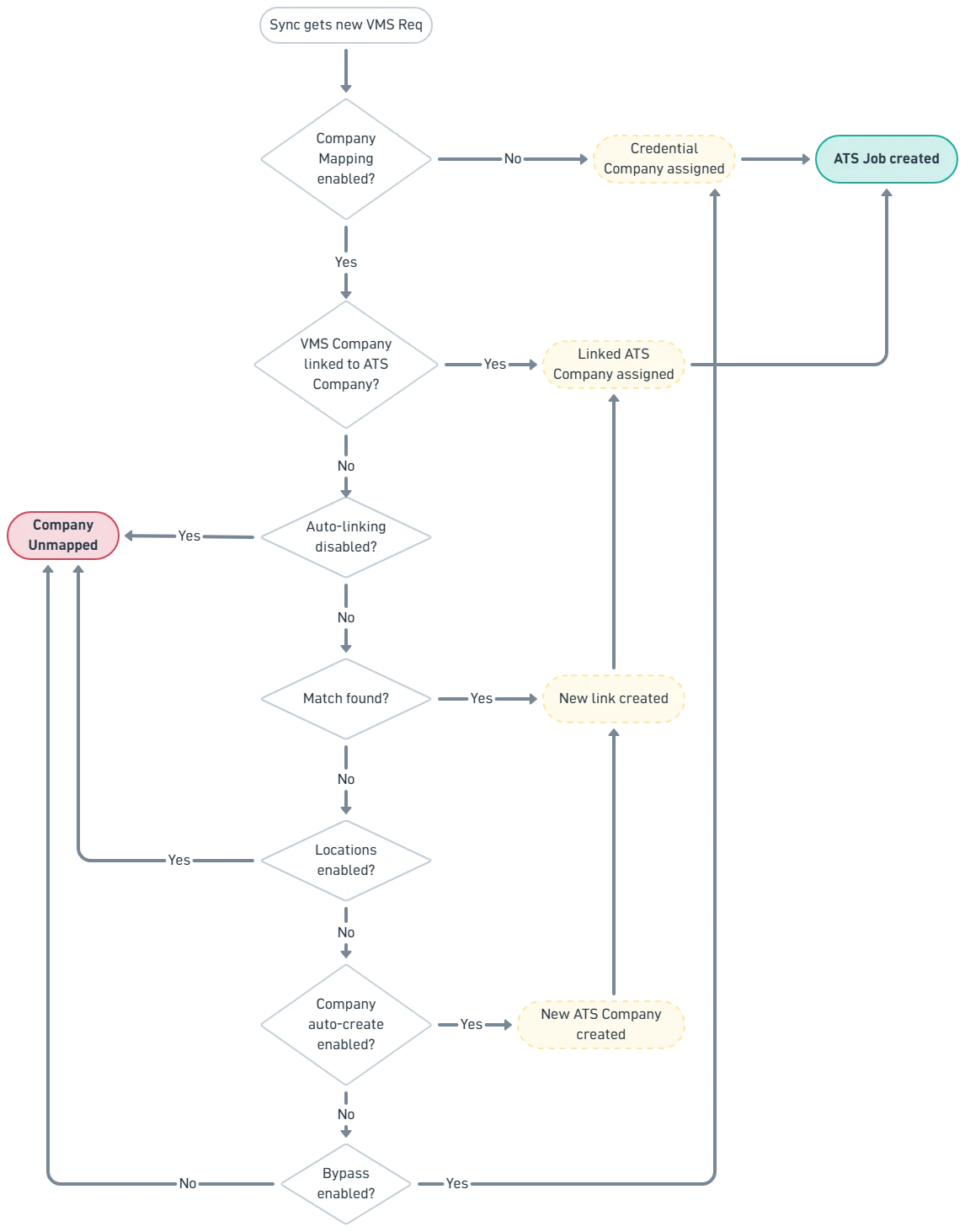
Company Resolution - Decision Tree
The following logic applies on every position sync attempt when Use Company Worksites is enabled.
Remote and No-Location Positions
does not have special handling for positions marked as "remote" or positions that arrive with no location data. Company matching is address-driven. A position with no recognizable address will not find an auto-link candidate and will land in an unmapped state.
When a position has no location, the following applies:
- If the VMS company is already linked to a Bullhorn Location (manually or via auto-link), the position syncs normally regardless of whether the job order is remote.
- If the VMS company is not linked and cannot be auto-matched, the position fails with a "Company unmapped" error and holds in the retry queue until resolved.
- If the credential has Bypass Company Mapping enabled, the position syncs through without a company assignment.
For customers with remote job orders, create a dedicated "Remote" or HQ Location record in Bullhorn, then manually link the VMS company representing remote work to that Location in the Company Mapping dashboard. This ensures remote job orders sync without manual intervention on each req.