E-Verify Submission Errors - Troubleshooting Guide
When an E-Verify An online system that confirms the eligibility of an Employee to work in the United States. The process compares information entered by an employer from an employee’s Form I-9, Employment Eligibility Verification, to records available to the U.S. Department of Homeland Security and the Social Security Administration to confirm employment eligibility. case fails to be created in Bullhorn, the error will fall into one of six categories. This guide explains each error type and provides step-by-step resolution instructions.
Failed Due to Receipt
What This Error Means
You will see an error message similar to: "Auto order E-Verify not sent due to I-9 Form I-9 to verify the identity and employment authorization of individuals hired for employment in the United States. Section 2 containing receipts."
This error occurs when the I-9 Form Any document that needs to be completed and signed by a Candidate Section 2 contains receipt documents instead of original documents. E-Verify cannot process cases with receipts.
How to Resolve
-
Wait until the candidate provides their original documents (not receipts)
-
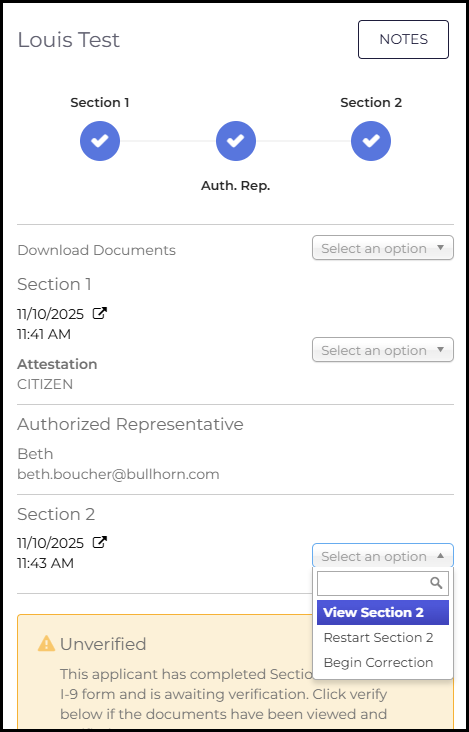
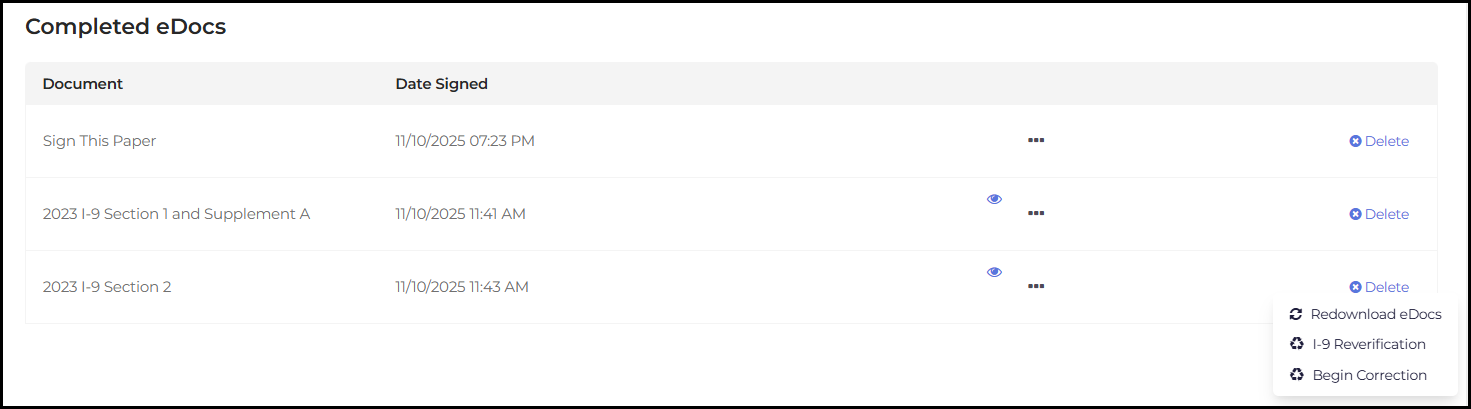
Once original documents are obtained, issue an I-9 Section 2 Correction
-
You can initiate the correction from either:
-
The Completed eDocs page, or
-
The I-9 Dashboard details panel
-
-
After correcting Section 2 with the original documents, resubmit the E-Verify case
Failed Due to Duplicate Case
What This Error Means
You will see an error message similar to: "One or more cases for this companyId and ssn already exist. The existing case number/s are 2025123456789FG. We recommend continuing with one of the existing cases or closing them out prior to creating a new one. If you still want to continue to create a new case, a value for the field DuplicateContinueReason must be provided."
This error occurs when an E-Verify case already exists for this employee's Social Security Number with your company.
How to Resolve
-
Review the existing case number provided in the error message
-
Determine if you want to continue with the existing case or create a new one
-
If you need to create a new case, select a value for the "Duplicate Continue Reason" field
-
Submit the case again with the duplicate reason selected
Failed Due to Incompatible Document Type or Invalid Data
What This Error Means
You may see error messages such as:
-
"The field LastName must match the regular expression '^[a-zA-Z''- ]*$'."
-
"Combination of Citizenship Status Code and Document Type Code is invalid."
-
"The CaseCreatorName field is required."
-
"The values for DateOfBirth is invalid. It must be before today and less than 120 years ago and date format must match format YYYY-MM-DD. Also, must be before DateOfHire."
These errors occur when data in the I-9 form contains invalid characters, incompatible document combinations, or missing required information.
How to Resolve
For Invalid Data Errors:
-
Identify which field contains the invalid data based on the error message
-
Initiate an I-9 Section 1 Correction if the error relates to employee information (name, date of birth, etc.)
-
Initiate an I-9 Section 2 Correction if the error relates to document information
-
After correcting the data, create a new E-Verify case
For Document Type Incompatibility:
Document types cannot be changed via I-9 Correction
-
Review the attestation type in I-9 Section 1
-
Compare it to the documents listed in Section 2 to identify the incompatibility
-
You may need to restart the I-9 process with the correct document combination
Recommended Prevention:
Enable the system setting "Filter Identity and Employment Authorization Document Lists based on Attestation" to automatically prevent attestation and document type incompatibilities during the I-9 completion process.
For Missing Case Creator Name:
The user who created the case is missing their first and last name in the system. Update the user's profile information and try again.
For Date of Birth Errors:
Update the Date of Birth in Section 1 to a valid date that is:
-
Before today's date
-
Less than 120 years ago
-
Before the Date of Hire
-
In the format YYYY-MM-DD
Failed Due to Misconfiguration or Missing Integration Properties
What This Error Means
You will see an error message similar to: "INVALID_CLIENT_COMPANY_AUTHORIZATION: Unauthorized to perform case operation for client company."
This error indicates that the E-Verify Client Company ID configured in your AbleVerify adapter integration properties is invalid or incorrect.
How to Resolve
Contact Bullhorn Support to verify and correct your E-Verify Client Company ID configuration. This requires administrative access to integration settings.
Missing Reason for Delay Code
What This Error Means
You will see an error message similar to: "ReasonForDelayCode is required if employee is not verified through E-Verify within 3 days of hire date."
This error occurs when you attempt to create an E-Verify case more than 3 days after the employee's hire date without providing a reason for the delay.
How to Resolve
-
Select a value for the "Late Verification Reason" field
-
This explains why the E-Verify case is being submitted after the 3-day deadline
-
Submit the case again with the late verification reason included

System Error
What This Error Means
You may see error messages such as:
-
"SYSTEM_ERROR: Unknown error."
-
"Endpoint request timed out"
-
Status shows "Fail" but the Errors column is blank
These errors indicate a technical issue with the E-Verify system or connection.
How to Resolve
-
Wait a few moments and try creating the case again
-
If the error persists after multiple attempts, contact Bullhorn Support for assistance
-
Provide Support with the exact error message and the time the error occurred
Additional Support
If you continue to experience E-Verify submission errors after following these troubleshooting steps, contact Bullhorn Support with the following information:
-
The complete error message
-
The candidate's name (or a reference number)
-
Screenshots of the error if available
-
Any steps you've already taken to resolve the issue