How Departments Divide Data in Bullhorn ATS
Learn how departments control record visibility in Bullhorn ATS.
When you assign a user to a department, that assignment determines which records they can see. This article explains the rules that govern visibility, including what changes when a user belongs to more than one department, so you can plan your department structure with confidence.
This article covers record visibility — which records a user can see based on their department membership. What a user can do with those records (edit, delete, and so on) is controlled by their user type and entitlements. For an overview of how all three concepts work together, see Departments, User Types, and Entitlements.
How Record Visibility Works
Every record in Bullhorn has a primary owner. A user can see a record if its owner belongs to one of the same departments as them.
Secondary ownership also plays a role: if a record has a secondary owner who shares a department with another user, that user can view the record — even if the primary owner is in a different department.
Think of it this way: a user's departments act as a window onto the database. The wider that window (the more departments a user belongs to), the more records they can see, and the more widely their own records are visible to others.
Entitlement Scope and Departments
Standard department-based visibility can be overridden by a user's entitlements. If a user has the View Any entitlement for a record type, they can see all records of that type across the entire database — even if they belong to only one department.
However, this only affects what the user can see outwards. Even with View Any access, a user's own records are still only visible to users who share their department. Their visibility out is expanded; others' visibility into their records is not.
If Laura has View Any access and belongs only to Department B, she can see every record in every department — but only users in Department B can see her records.
If a user only has the View Own entitlement for a record type, and not View Any or View Department, they can only see records they personally own. This applies regardless of how many departments they belong to.
To understand how these and other entitlements are configured, see User Action Entitlements in Bullhorn ATS.
Sample Cases
The following examples use a simplified three-department setup to show how visibility changes as a user's department membership changes. In each case, Laura is the user whose department assignments change. Andrew belongs to Department B. Amanda belongs to Department C. For these examples, all users have standard department-based visibility — that is, the View Department entitlement is enabled on their user type.
Case 1: Laura Belongs to One Department
When Laura belongs only to Department A, she can see records owned by other users in Department A, and they can see hers. She has no visibility into Departments B or C, and neither department has visibility into her records.
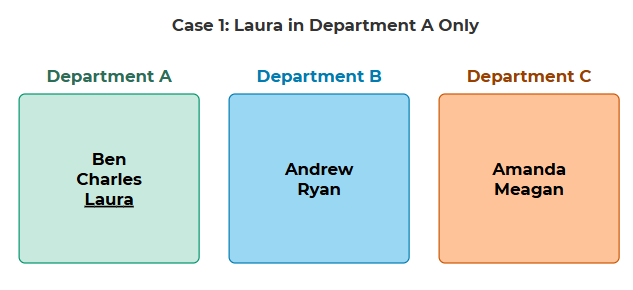
| Scenario | What She Sees | What Others See |
|---|---|---|
|
Laura in Dept A only |
Records owned by Dept A users only |
Only Dept A users can see Laura's records |
Case 2: Laura Belongs to Two Departments (B and C)
When Laura is added to both Department B and Department C, she can see records in both departments. All users in either department can now see her records. However, Amanda (Dept C) still cannot see Andrew's records (Dept B) — Laura's cross-department membership doesn't create a connection between those two departments for other users.
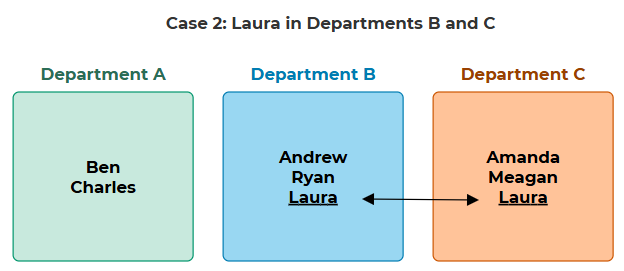
| Scenario | What She Sees | What Others See |
|---|---|---|
Laura in Depts B and C | Records owned by Dept B and Dept C users | All users in Dept B and Dept C can see Laura's records |
Amanda (Dept C only) | Records owned by Dept C users only | Only Dept C users can see Amanda's records |
Case 3: Laura Belongs to All Departments
When Laura belongs to all departments, she can see every record in the database, and every user across all departments can see her records.
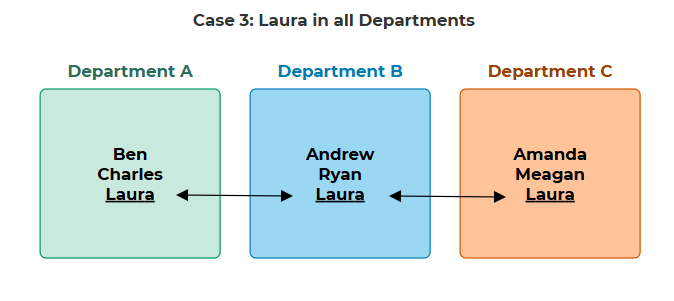
| Scenario | What She Sees | What Others See |
|---|---|---|
Laura in all departments | All records across all departments | All users across all departments can see Laura's records |
Case 4: Laura Has "View Any" Entitlements but Belongs to One Department
When Laura has View Any access but belongs only to Department B, she can see every record in the database, but only users in Department B can see her records. Her expanded visibility does not make her records visible in other departments.
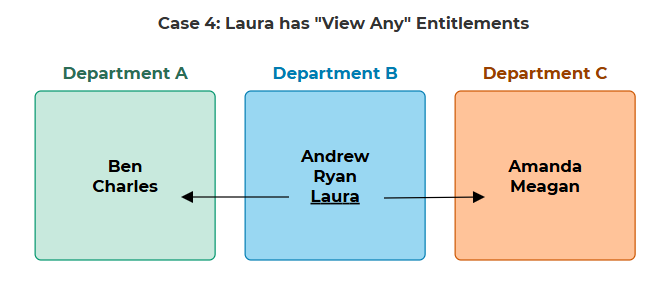
| Scenario | What She Sees | What Others See |
|---|---|---|
Laura with View Any entitlements, Dept B only | All records across all departments | Only Dept B users can see Laura's records |