February 2026 Release: Omnitable Features & Enhancements
February 2026 (2026.02 GA Release - Package Version 9.41)
Omnitable Named Views: Entering Decimal Values in Number and Currency Filter
-
Feature: Omnitable
-
Level of Configuration: None
Up to this release the number and currency input component used in Omnitable Named Views condition popover did not support entering decimal values. Now, decimal numbers are supported in Omnitable Named View filtering for Number, Percent, and Currency field types.
How this works:
- Omnitable now displays the decimal number to the field's configured decimal places
-
Named View filtering restricts the input number to the field's configured decimal places
-
Named View filtering condition list now shows the number to the field's configured decimal places
-
Named View query will now query a range when querying on decimal fields. The range queried depends on the configured decimal places for a field. The range will encompass all numbers that would have rounded to the queried number, given the configured number of decimal places for that field. For example:
-
When searching for 123.45 on a two decimal place field, the query will search 123.445 - 124.455
-
When searching for 123 on a two decimal place field, the query will search 122.995 - 123.005
-
When searching for 123 on a zero decimal place field, the query will search for 122.5 - 123.5
-
Allow "Reject/Unreject" Action in Omnitable for Candidates in Closing Report
-
Feature: Omnitable
-
Level of Configuration: Low
In this release we have enabled the Reject/Unreject action in Omnitable for candidates in the Closing Report stage, aligning its functionality with ATSv2.
Configuration
The same setting is used to enable rejection for Candidates in the Closing Report stage in both ATSv2 and Omnitable: .
Omnitable Multi-Select/Single-Select
-
Feature: Omnitable
-
Level of Configuration: Low
Administrators can now control how many records users can select in an Omnitable by configuring the maximum row selection limit.
Previously, Omnitable's multi-select checkboxes supported up to 2000 records but lacked the ability to restrict selection to a single record or set configurable selection limits.
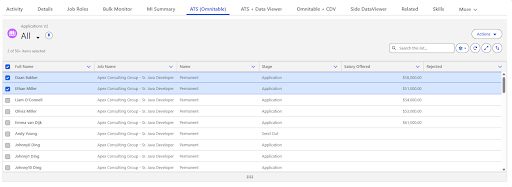
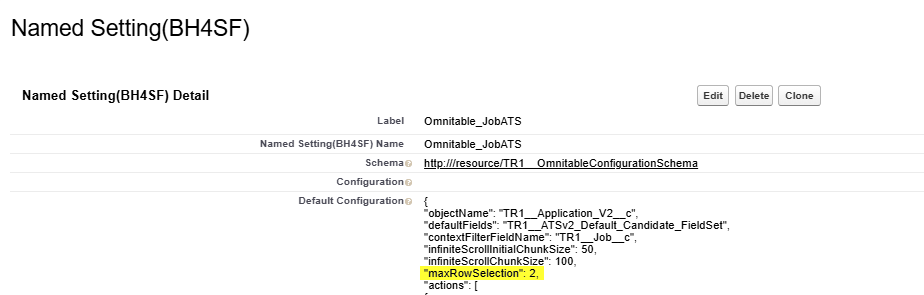
Now, you can configure the maxRowSelection parameter in your Omnitable to control selection behavior. This allows you to enforce single-select mode with radio buttons, limit multi-select to a specific number of records, or disable selection entirely.
Selection behaviors based on configuration:
-
maxRowSelection = 0: All row checkboxes are disabled, and users cannot select any records
-
maxRowSelection = 1: Checkboxes are replaced with radio buttons, allowing only one record to be selected at a time. The "Select All" checkbox is hidden
-
maxRowSelection > 1: Users can select up to the configured number of records. Once the limit is reached, all unselected checkboxes become disabled. When "Select All" is used, only the top N records are selected
-
maxRowSelection not specified: Default behavior is maintained (checkbox multi-select with 2000 record limit)
Configuration
To configure row selection limits for an Omnitable:
-
Navigate to .
-
Find your Omnitable configuration record.
-
Edit the JSON configuration.
-
Add the maxRowSelection parameter at the top level with your desired value (integer).
-
Select Save.
Expose SelectedIds as a Flow Based Variable
-
Feature: Omnitable
-
Level of Configuration: Low
Summary
Omnitable and OmnitablePlus now expose selectedIds as an output variable in Screen Flows. Admins can use this variable to pass the list of records a user has checked in Omnitable directly into any downstream Flow component — including custom LWC components they build themselves.
Background
When a user selects rows in Omnitable inside a Screen Flow, the component tracks two things: the single record the user last clicked (highlightedRecordId) and the full list of checked records (selectedIds). Previously, highlightedRecordId was available as a Flow variable that any component could read, but selectedIds was only accessible internally by Bullhorn's own packaged components. Admins building custom flow-based actions had no way to retrieve the full selection.
What Changed
selectedIds is now a proper Flow output variable on both Omnitable and OmnitablePlus. Whenever a user's selection changes, the component fires a FlowAttributeChangeEvent that notifies the Flow runtime, making the updated list of IDs immediately available to any subsequent element in the flow — native Flow components, Bullhorn components, or custom LWC components built by Admins.
The property is declared as String[] with no role restriction, meaning it can also be used as an input to pre-populate selections if needed.
How to Use It
In Flow Builder, after placing Omnitable on a screen, selectedIds will appear as an available output from that component. It can be:
-
Assigned to a collection variable via an Assignment element for use later in the flow.
-
Passed directly as an input to a subflow or Action that accepts a list of record IDs.
-
Referenced in custom LWC screen components as a flow input property.
Replacing the Contact Search Step in AEF Add To Call List
A common use case is building a custom flow that uses Omnitable for record selection and then feeds those records into the packaged AEF Add To Call List subflow.
AEF Add To Call List accepts a contactIds input variable (a collection of Strings). When that variable arrives pre-populated, the flow skips its internal contact search screen and goes straight to the Call List picker — showing only a count of how many contacts are selected.
Previously, an Admin could not populate contactIds from Omnitable because selectedIds was not accessible. The recruiter would have to search for and reselect the same contacts manually inside the subflow, even after already checking them in Omnitable.
With this change, the Admin can wire up the flow as follows:
-
Place Omnitable on Screen 1 so the recruiter checks the rows they want to act on.
-
Use an Assignment element to assign {!Omnitable.selectedIds} to the contactIds variable.
-
Call AEF_Add_To_Call_List as a subflow, passing in contactIds.
The recruiter selects records once in Omnitable and moves straight to choosing a Call List — no duplicate search step required.