Add UE Claim
In the event of a Candidate being separated from an Agency, they may opt to file for unemployment relief. This initiates a claim with the Dept of Labor (DOL) and the DOL then sends a request for response to the Agency to explain the reason for separation. The DOL will make a determination on whether or not to allow benefits and notify the Agency. The agency may wish to appeal this determination, or may try to find an opportunity to put the employee back to work.
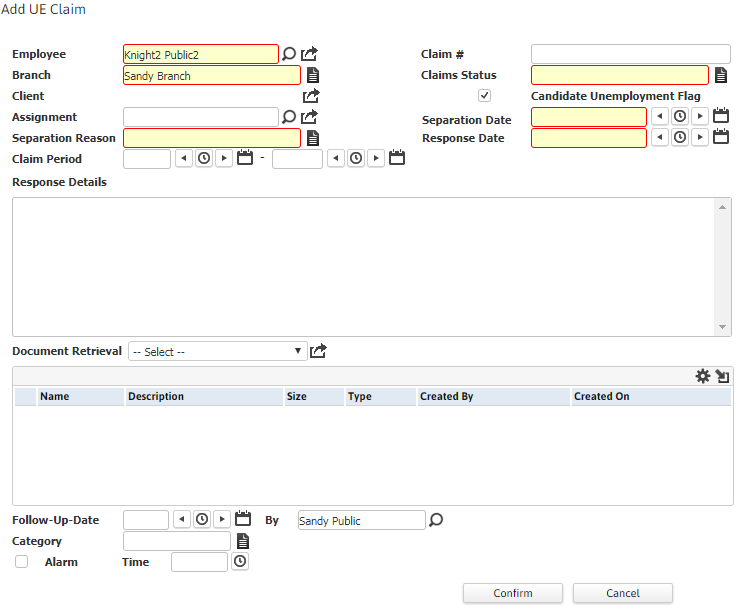
Add UE Claim allows you to perform a workflow to report an unemployment claim filed by a Candidate.
Use these instructions to add a UE Claim to a Candidate record.
- Select Activities drop-list > Candidate Activities > Add UE Claim.
- The Add UE Claim workflow will open in a new window.
- While updating the form, notice that fields marked in red are required to complete the workflow; and by clicking on the buttons to the right of certain fields, a new window will open, allowing you to select options related to that specific field.
-
Click Confirm to complete the workflow. The new workflow record is saved in the UE Insurance Claims widget under My Studios. (See My Studios: UE Insurance Claims.)
-
Once the new unemployment claim workflow is created, the same is reflected in the Candidate Summary screen with a checkmark against the 'Active UE Claim' field.
An internal notification (called 'Candidate Unemployment Flag Updated') is triggered when a new unemployment claim workflow is created.
-
Verify the New UE Claim Added entry and notes from workflow posted to the journal.
