Schedule a Meeting (Candidate)
Use this workflow to schedule a meeting between the candidate and the staffing manager or recruiter. This workflow can be run from the Meetings Segment or the Candidate Activities workflow menu.
- Select the Schedule a Meeting from the Candidate Activities menu.
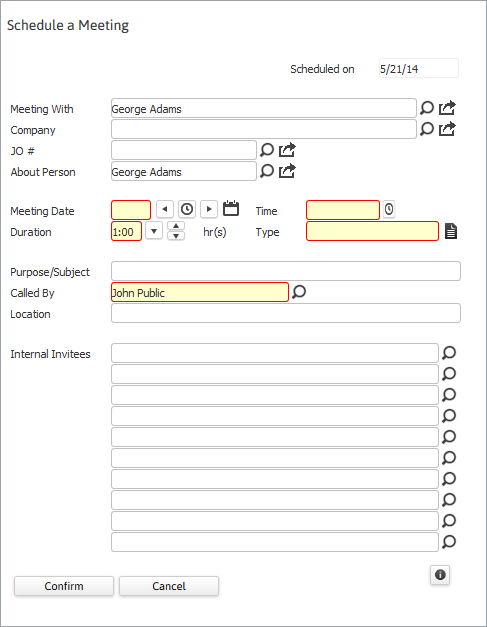
- Update the necessary information; fields in red are required to complete the workflow.
- By clicking on the buttons to the right of certain fields, a new window will open, allowing you to search and select options related to that specific field, or choose a date.
- You can invite up to 10 other account managers or recruiters to attend the meeting.
-
Click Confirm to complete the workflow.
-
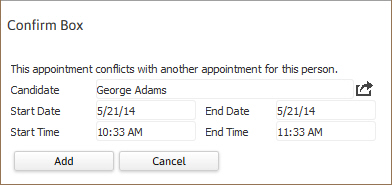
If there is another event on the candidate’s calendar a Confirmation box will open to alert of the conflict. Click Add to accept the conflicting event or Cancel to return to the schedule a meeting window and change the date or time of the event.
-
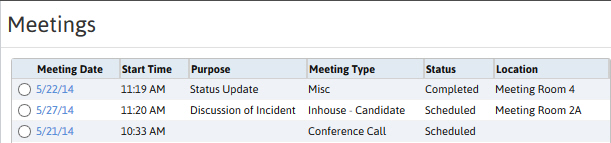
After the workflow is complete the Meeting segment will refresh to display the new event record in the list box.
-
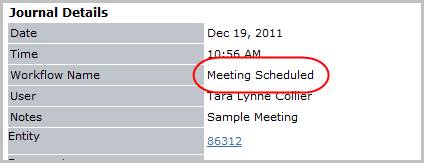
Verify the Meeting Scheduled entry posted to the journal.