| Edition: Enterprise | Audience: All Users |
Manager's Toolkit: Candidate Care
The Candidate Care report shows key activities against each candidate, showing the Organization and Job Title if there is an associated activity, such as CV Sent or Interview.
The report details:
- If the candidates were recently added within the timeframe.
- If their CV has been sent or specced.
- How many calls have been made.
- If they have interviewed or placed.
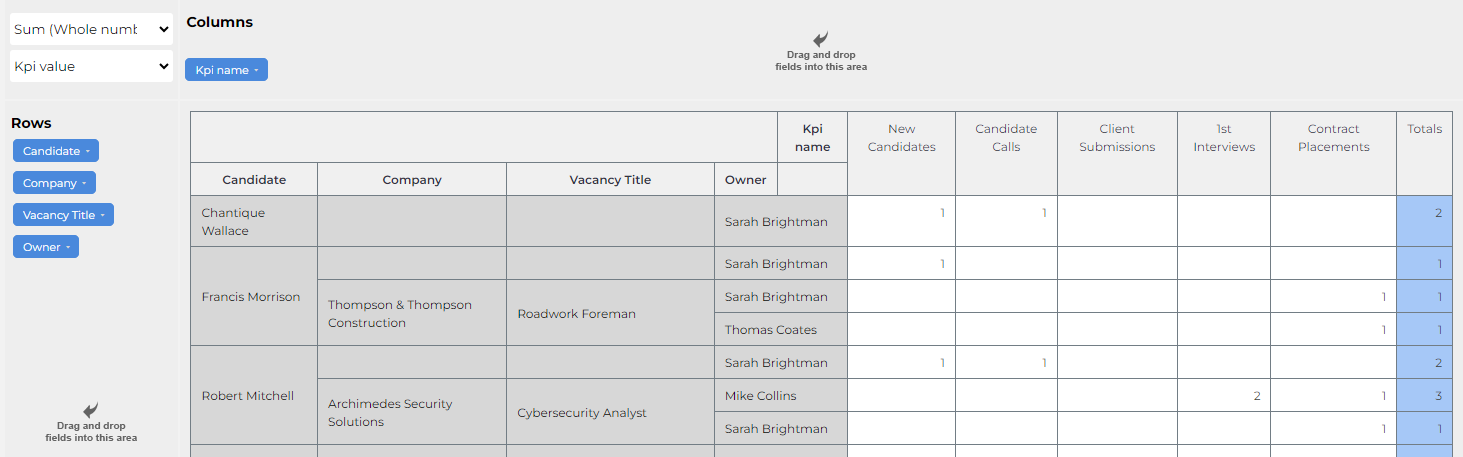
This report is part of the Slice & Dice Manager's Toolkit.
Key Questions This Report Helps Answer
- Are we optimising activity for our most successful candidates?
- Are we actioning newly registered candidates?
- Are there candidates that we are working on that are unlikely to yield output?
Tips
You can use any blue variable to refine the data displayed, even if it is not one that you are using to format the report. For example, follow the steps below to refine the report to only show candidates owned by one consultant:
- Click on the Owner variable.
- Choose Select None and then select the consultant whose data you want to view.
- Scroll down to the bottom of the list and click Apply.
The filters that you apply to a report in this way are not saved, so you’ll need to add them again if you run the report again.
Was this helpful?