| Edition: Enterprise | Audience: All Users |
Manager's Toolkit: Contract & Perm Starter Care
The Contract & Perm Starter Care report shows shows the following data for this month by Owner, Organization, Job Title and Candidate name:
- Contractors out in Period
- Contractors Starting
- Contractors Finishing
- Perm Starters
Its purpose is to help provide a clear and real time overview of who is on contract and who is about to kick off their contracts or permanent roles.
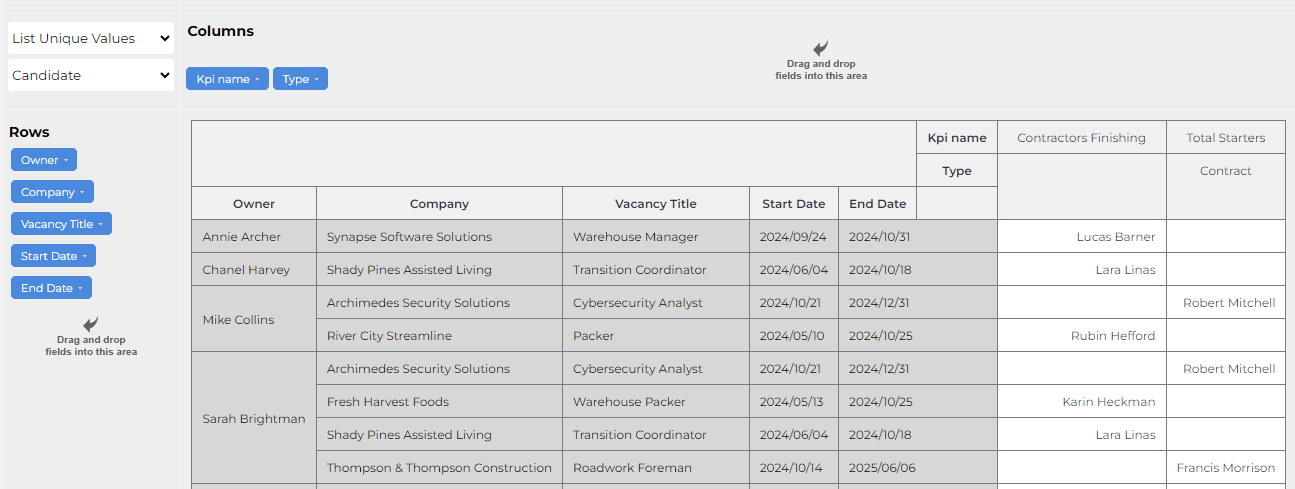
This report is part of the Slice & Dice Manager's Toolkit.
Key Questions This Report Helps Answer
- Which contractors are active this month?
- Are we actively managing our starters and finishers?
- Are we actively trying to get our finishers extended/placed into new opportunities?
- Which clients do we have the most active contractors in and what role types are they active with?
Tips
- Pull out the Owner variable, or drag and drop it to the bottom of the rows axis, to cluster all contractors working at the same client together. The default is to cluster by owner.
- To remove Perm Starters, de-select the relevant metric from the dropdown and rerun the report. You can save your own version so it is easy to run in the future.
Was this helpful?