| Edition: All Editions | Audience: User Admin |
Setting Visibility Permissions
This article provides instructions on how to give users Visibility Permissions.
Visibility Permissions
Following on from setting Core permissions, the User Admin should set the visibility permissions for each feature for the user.
Setting the correct visibility level for users is critical. It determines the level of the data they have access to and what data they see when they log in. The User Sees, and Landing Page options are specific permissions for the user, whereas the OneView Page and Date Format can be set at the user level or Inherited from Parent Group, i.e. the user inherits a setting defined at the group level.
- Dashboard Editing Abilities: Set the level of Dashboards Editing permission for each user using this drop-down:
- None: Allows users to see Dashboards and apply filters, but make no changes.
- Basic: Adds the ability to change the layout of Dashboards panels.
- Full: Adds the ability to create new Dashboards and add panels.
- User Sees: Users are set to see everyone in the account by default, but this can be changed to see just their group (and any subgroups of the group they are in), or themselves only.
- Landing Page: Each user will default to land on the OneView page, but this can be changed to any of the App Permissions active against that user.
- OneView Page: Here, you can either choose a specific page for the user or for the user to inherit the default OneView page selected at the displayed group level by checking the Inherit from Parent Group box.
- Date Format: Here, you can choose the UK or US Date Format for the user or set them to inherit the default Date Format selected at the displayed group level by checking the Inherit from Parent Group box.
Steps
- Go to Admin > Users > Manage Activated Users and click on a name to access the user’s profile.
- Scroll down to see each visibility permission and select as appropriate.
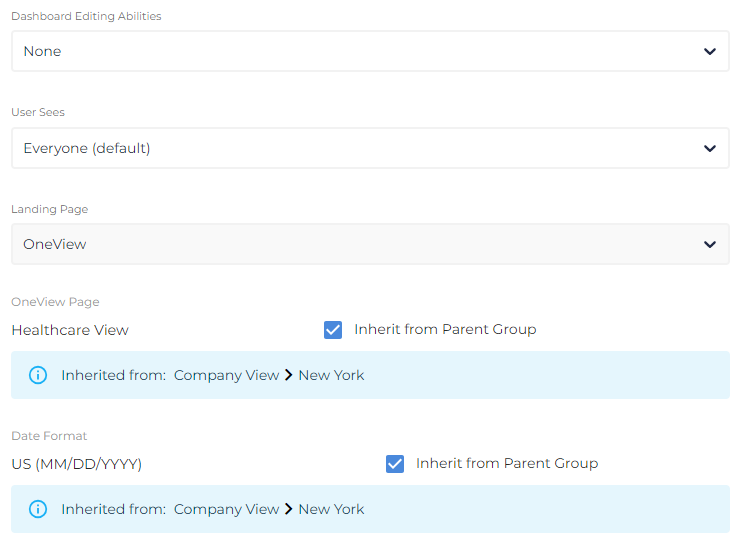
All settings will automatically save.
Was this helpful?