| Edition: All Editions | Audience: User Admin |
Managing Orphan and Inactive Users
This article explains what Orphan and Inactive users are in and how they are managed from the Admin USERS section.
- Orphan Users: Orphaned users have been set to be visible and can log in to , but they lack a current group assignment. Without this, they are unable to login or be seen within .
- Inactive Users: Inactive users are not visible and cannot log in to . They may not need access but can be reactivated as a Full User or an Observer at any time by a User Admin.
Orphan Users
- Go to Admin > Users.
- Select the tab for Orphan Users.
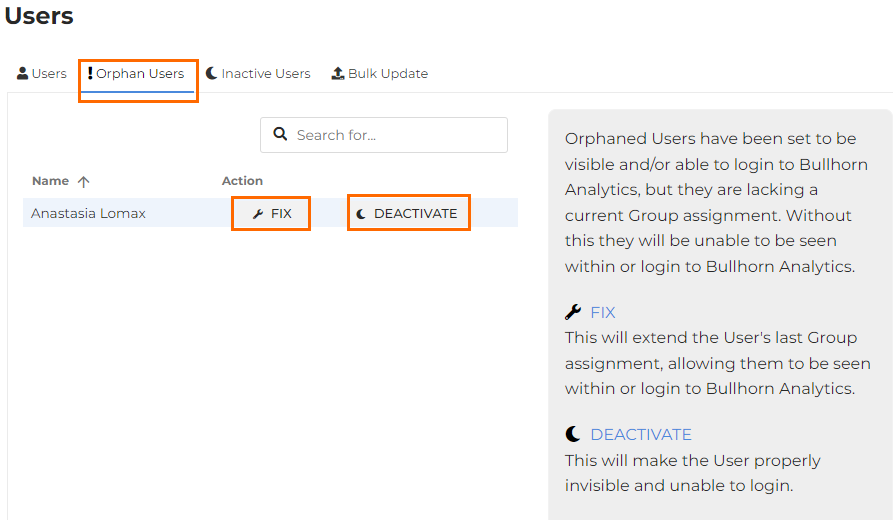
- Choose to Fix or Deactivate the Orphaned User:
- Fix: This will extend the user's last group assignment, allowing them to be seen and to login to Bullhorn Analytics. Note: If this does not work as expected, then please raise a ticket with the Analytics Support team.
- Deactivate: This will make the user invisible and unable to log in. Their data will still be reportable in Bullhorn Analytics.
For help with adding users to Groups, see Adding Users to Groups
Inactive Users
- Go to Admin > Users.
- Select the tab for Inactive Users.
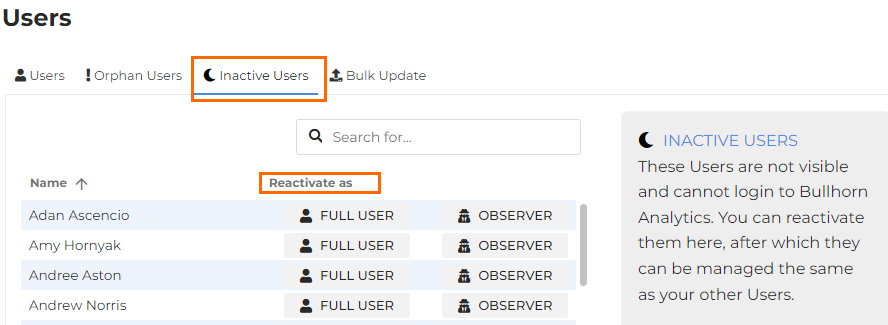
- Choose to reactivate the Inactive user as Full User or Observer.
All settings will automatically save.
For help with activating users, see Activating Users.
Was this helpful?