October 2025 Release: Other Enhancements Features & Enhancements
October 2025 (2025.10 GA Release - Package Version 9.21)
Keyboard Navigation Now Supported For The Interaction Between Omnitable and Contextual Data Viewer
When viewing an Omnitable, you can now use the "up/down" arrow keys and the space bar on your keyboard to navigate between rows: this means you can move quickly between records and view their contextual data without using your mouse.
Up/Down keys and Space bar navigation is only enabled when a row is highlighted (clicked in).
Improved User Experience When Receiving Notifications After A Flow-Based Action Is Executed Asynchronously
Users reported that when running a flow-based action asynchronously, in case of errors they would receive a notification for each 'chunk' processed (which meant potentially multiple duplicate notifications) and also that the messaging in the notification was not helpful (would not specify how many records failed).
We have reviewed the process and made the following improvements:
- 'Chunks' errors notifications are now consolidated and only one notification is sent at the end of the processing: note that the notification message contains the number of records failed out of total records processed.
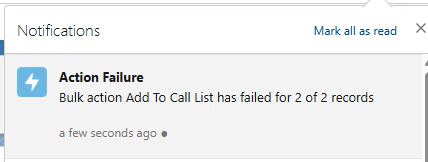
- On clicking on the notification message, the user is navigated to the relevant log record created against the Bulk Action Log object (TR1__BHHV_Bulk_Action_Log__c).
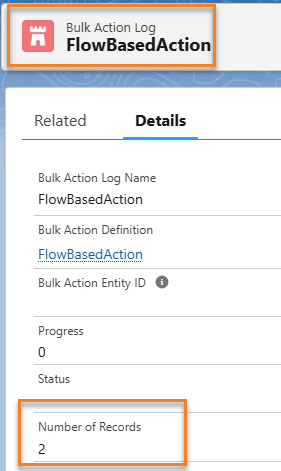
Further information about the failures can be found by going to the Related tab on the log record, where users can access the records created for each failure against the Bulk Action Log Detail object (TR1__BHHV_Bulk_Action_Log_Detail__c).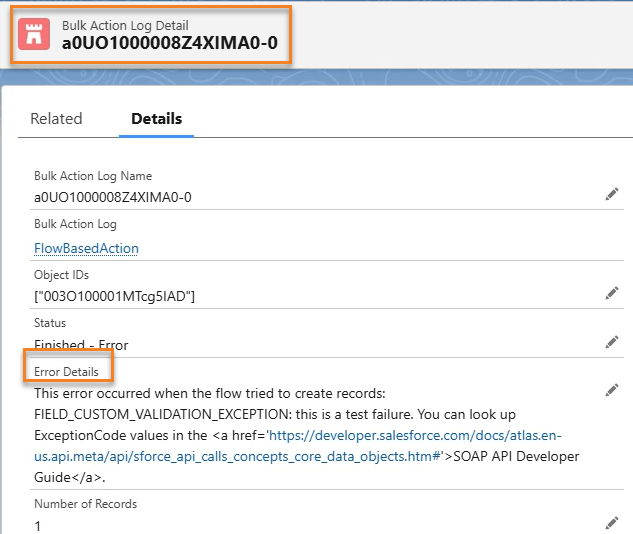
'Email To Parse' New Option: If The Resume Has No Email, The Contact's Email Field Is Blank
When the Email To Parse was used for the Broadbean integration and the resume being parsed had no email, up to this release Admins could choose to have the Candidate's Email in Salesforce populated with either Broadbean 'fromAddress' or Broadbean 'replyTo'. But there was no option to just leave the field blank. Now this is possible with a new configuration option.
Configuration
- Go to Setup > Custom Metadata Types > Inbound Email Sender.
- Enable the Do Not Infer Contact Email checkbox.
This checkbox overrides what is selected in the Email address for Contact field and results in the Contact's Email field being blank if the parsed resume does not contain an email address.
Update On Conversion of BHRC Packaged Workflow Rules To Flow
In this release you will find in the package the following Flows, to replace existing packaged Workflow Rules in preparation for Salesforce withdrawal of support for Workflow Rules:
- WFR downloadResume > Flow 'Download Resume Daxtra'
- WFR Send Internal Interview Email Invitation > Flow 'Send Internal Interview Email Invitation'
- WFR Send Interview Email Invitation (SendOut Schedule object) > Flow 'Send Interview Invite V1'
- WFR Send Interview Email Invitation (SendOut Schedule v2 object) > Flow 'Send Interview Invite V2'
Please read the following for more details on the planned work to complete the conversion to Flow of all packaged Workflow Rules: BHRC WFRs Conversion to Flow - Key Points for Customer Communication