Amplify Dashboards: Enrich from Notes Tab
The Enrich from Notes tab of the Bullhorn Analytics prebuilt Amplify Impact & Adoption Dashboards shows how your team is using Enrich from Notes. Use it to track how many Notes are used to update records and by whom, see how many fields are updated and how much is automated, and see how Enrich from Notes relates to submissions and placements.
This dashboard is only available to Bullhorn Amplify customers.
For definitions of each metric used in this dashboard, see Amplify Enrich from Notes Metrics Dictionary.
Accessing the Dashboards
-
Log in to Bullhorn Analytics.
-
Select the Dashboards module at the top of the screen.
-
Select
 Open in the sidebar to view available dashboards.
 -
Select Amplify Impact & Adoption Dashboards.
-
Select the tab you want to view.
Dashboard Toolbar
The dashboard toolbar contains options for filtering and refreshing data:
- Refresh: Select the circular arrow icon
 in the top right to update all panels with the most current data from your Bullhorn system.
 - Filter: Select the filter icon
 to display or hide the dashboard top-level filters.
Top-Level Filters
All panels use inherited dashboard settings. The following filters apply across every tab.
Company View Filter
The company view filter controls whose data the dashboard displays by default. Select Logged in User to view your own data. If you save the dashboard with this filter active, it becomes your default view each time you open it. Select Logged in User's Group to view your team's data. This shows data for all users in your group.
Timeframe Filter
Use the date picker to select a timeframe or choose a custom date range. Every panel on the dashboard uses the selected timeframe. The default for this dashboard is Last 30 Days.
Client Filter
Use the Filter by Client dropdown to search for or select a specific client.
Dashboard Panels
Enrich from Notes Deployment
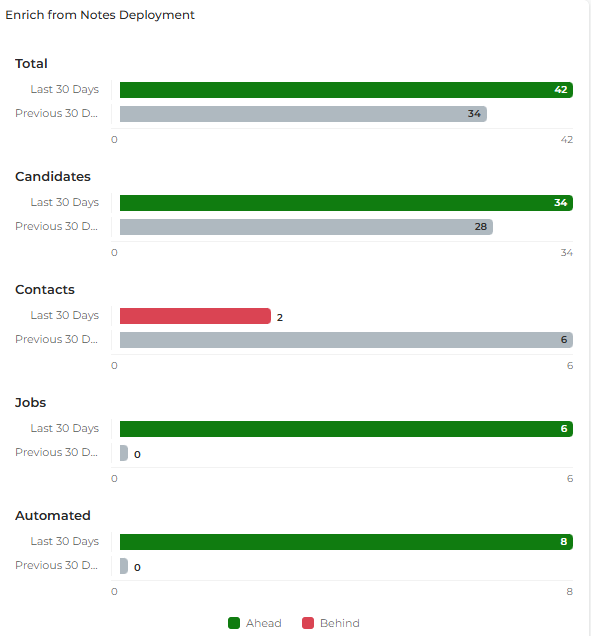
An Impact Comparison Panel that uses a bar chart to compare Enrich from Notes activity in the selected timeframe against the previous period across five measures. Each measure shows the current period against the prior period. Use this panel to see whether Enrich from Notes usage is growing. Higher values are better for all five measures.
Clicking anywhere on this panel opens a grouped view of all the panel's metrics, organized by category with a percentage change badge shown for each group. See Impact Comparison Panel Clickthrough Navigation for details.
Each section corresponds to the following metric:
- Total: A Period vs Prior Period comparison for Enrich From Notes: Total.
- Candidates: A Period vs Prior Period comparison for Enrich From Notes: Candidates.
- Contacts: A Period vs Prior Period comparison for Enrich From Notes: Contacts.
- Jobs: A Period vs Prior Period comparison for Enrich From Notes: Jobs.
- Automated: A Period vs Prior Period comparison for Enrich From Notes: Automation.
Top Users: Enrich From Notes
A Leaderboard Panel that ranks users by the number of Notes they used to enrich records, in descending order. Use this panel to identify the users who use Enrich from Notes most. Ranked by: Enrich From Notes: Total.
Non-Adopters: Enrich From Notes
A Leaderboard Panel that ranks users by the number of Notes they used to enrich records, in ascending order, so the users who use Enrich from Notes least appear first. These are not necessarily users with no activity. Use this panel to identify the users who use Enrich from Notes least. Ranked by: Enrich From Notes: Total.
Reach out to the users at the top of this list to find out whether they need training or support to use Enrich from Notes.
Enrich from Notes: Placement Impact
A Ratio Panel that shows the percentage of total placements in the selected timeframe where the Candidate, Client Contact or Job was updated via Enrich from Notes in the prior 6 months, compared against the previous period. A higher percentage is better. Use this panel to see how much of your placement activity Enrich from Notes is involved in. The panel displays the ratio Enrich from Notes Impact.
For the ratio definition, see the Ratios section of the Amplify Enrich from Notes Metrics Dictionary.
Key Metrics Assisted by Enrich from Notes: This Period vs Last Period
An Impact Comparison Panel that uses comparison bars to compare the submissions and placements assisted by Enrich from Notes in the selected timeframe against the previous period. Higher values are better for all three measures. Use this panel to see whether Enrich from Notes is helping to drive submissions and placements.
Clicking anywhere on this panel opens a grouped view of all the panel's metrics, organized by category with a percentage change badge shown for each group. See Impact Comparison Panel Clickthrough Navigation for details.
The panel tracks the following measures:
- CVs Sent / Client Submissions: A Period vs Prior Period comparison for CVs / Client Subs: Enrich from Note Assisted.
- Shortlist / Internal Submissions: A Period vs Prior Period comparison for Internal Subs: Enrich from Note Assisted.
- Placements: A Period vs Prior Period comparison for Placements: Enrich From Notes Assisted.
% Enrich from Notes Automated
A Ratio Panel that shows the percentage of Notes used to enrich records that were processed by the Enrich from Notes automation step. This panel does not compare against the previous period. Use this panel to see how much of your Enrich from Notes activity is automated. The panel displays the ratio % Enrich from Notes Automated.
For the ratio definition, see the Ratios section of the Amplify Enrich from Notes Metrics Dictionary.
Enrich From Notes: Fields Enriched
A Metric Panel that shows the number of fields updated by Enrich from Notes in the selected timeframe, compared against the previous period. A higher number is better. This counts fields, not Notes, so one Note can update several fields. Use this panel to see how much information Enrich from Notes is adding to your records. The panel shows the metric Enrich From Notes: Fields Enriched.
Fields Enriched Data Sheet
A Small Data Grid that lists each Enrich from Notes update in the selected timeframe, with the fields updated, the record involved, the owner and the created date. Each row is one update. Use this panel to see exactly which fields are being updated, on which records and by whom. The panel shows the metric Enrich From Notes: Total. For attribute definitions, see the Fields Enriched Attributes section of the Amplify Enrich from Notes Metrics Dictionary.
Performance Snapshot
A Performance Snapshot Grid that shows the key Enrich from Notes metrics and ratio by group and user. Expand a group to see the users within it. Scroll across to see all columns. Use this panel to compare Enrich from Notes adoption across teams and individuals. The grid shows the following metrics and ratio:
- Enrich From Notes: Total
- Enrich From Notes: Candidates
- Enrich From Notes: Contacts
- Enrich From Notes: Jobs
- Enrich From Notes: Fields Enriched
- Internal Subs: Enrich from Note Assisted
- CVs / Client Subs: Enrich from Note Assisted
- Placements: Enrich From Notes Assisted
- Enrich from Notes Impact (ratio)